Self-Checkout Systems Explained: Types, Benefits & Implementation Guide for Retailers
Then, there’s the other side of the story. You head out to a big supermarket, with thousands upon thousands of customers every day … and no queues? Why? Because they’ve got a row of self checkout systems that take the pressure off the tills, all while cutting payroll expenses.
Self checkout machines have exploded onto the retail scene in the last decade or so. They’ve been found to boost growth of stores that implement them wildly, and they’re popular with customers, too. So today, we’re talking about the benefits of self-checkout, and looking at how you can implement one in your store. We’ll cover:
-
What are self-checkout systems?
-
Types of self-checkout systems
-
How self-checkout systems work
-
Components of self-checkout systems
-
Benefits of self-checkout systems
-
Challenges and considerations
-
How to implement self-checkout systems
-
Self-checkout statistics and market trends
Once we’re done here, you’ll know how to get a self-checkout system running and what you need to bust the queues in your business. We’ll not keep you waiting any longer. Let’s get started.
What are self-checkout systems?
Self-checkout systems are tills where the customer can be their own cashier, essentially automating the checkout process for retailers. Customers scan, bag, and pay for their purchases without the direct assistance of your staff.
Originally introduced in the late 1990s and early 2000s, these kiosks evolved from simple barcode scanners to sophisticated, touchscreen-based terminals with integrated payments and software designed to prevent exploitation and theft. According to deployment estimates, there were roughly 191,000 self-checkout units worldwide in 2013 and around 1.2 million installed by 2025, showing just how popular they’ve become across many industries.
Globally, the self-checkout market is growing rapidly: projections expect it to expand from the USD 4.9 billion last measured in 2024 to well above USD 10 billion by the early 2030s as retailers everywhere pursue faster service and labour savings.
Today’s self-checkout market gives you options too (which we’ll explore later on), including traditional kiosk lanes, handheld/mobile scanning, and fully touchless systems, each suited to different store sizes, contexts, and customer preferences.
Types of Self-Checkout Systems
Standard Self-Checkout Kiosks
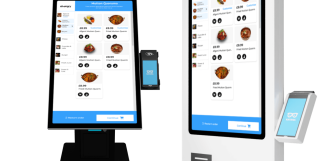
Most customers are now familiar with the most common self-checkout systems. These have built-in barcode scanners, and a space each side for the basket and for bagging. The customer scans items across (and sometimes weigh selected products, too), the screen shows and tallies the cost of each product, and then allows them to checkout with on-screen payment options and an integrated card machine. They’re fairly affordable (though smaller businesses may struggle to justify the upfront expense), and they’re also easy to retrofit into existing stores. Downsides include shrinkage risk and occasional assistance needs. They’re best suited to groceries, supermarkets, and big-box stores. This type of checkout is already common across retail chain stores like Walmart and Tesco.
Mobile Scanners & Smart Carts
Scan-as-you-shop systems are popular in many supermarkets and wholesalers, as they minimise checkout time. Customers use handheld scanners and smart carts to tally purchases as they add them to their trolley. Customers can bag items as they go, then pay and leave straight away. This reduces queues and crowding at checkouts, as the scanning is already done, which is perfect for large baskets. However, hardware costs and training can be quite high. Ideal as an investment for supermarkets and warehouses, or for any large-basket businesses.
Mobile Scan-and-Go Apps
Mobile scan-and-go is similar to the smart carts seen above. The big difference? Customers use their own smartphones to scan items through a retailer’s app, then pay digitally and only need a receipt as they exit. Given there’s no need for hardware, this makes mobile app self-checkouts a brilliantly low-cost option for smaller retailers to deploy, and it’s highly scalable for growing businesses. However, it does rely on customer adoption of the app, and can increase shrinkage without audits, as there’s little staff oversight. Perfect for convenience, club stores, and businesses with tech-savvy customers. It’s also great as a lightweight entry point into self-checkout without the new hardware.
Self-Checkout Ordering Kiosks
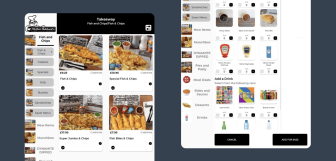
Already common in hospitality businesses like takeaways and quick-service, but also used in businesses like Argos, touchscreen ordering kiosks let customers browse menus, populate their own order and pay without a cashier. Then, they collect their purchases as soon as their ready, leaving staff to just provide the pre-paid orders. This allows businesses to build in upsells, and reduces ordering errors, which is great for those looking to boost efficiency and maximise each sale.
RFID Scanner Gates
RFID-enabled systems allow customers to walk through a gate that instantly reads tagged items and generates a total automatically. No individual scanning is needed, making checkout nearly frictionless. The trade-offs are the significant infrastructure costs. These are not yet common in the retail industry, but would work best for apparel stores (customers could wear the clothes out the door with no hassle!), or electronics and industries with strictly controlled inventories.
AI / Computer Vision Systems
Camera-based checkout uses sensors and machine learning to identify products automatically as shoppers pick them up, removing the need for barcodes entirely. The experience is totally seamless and queue-free, but installation and maintenance are very expensive and technically complex. Once again, this method of self-checkout isn’t yet seen commonly, but would work best for supermarkets with large inventories where these systems can make full use of their capabilities to speed up checkouts. Examples include Amazon’s “Amazon Go” concept and Toshiba’s MxP platform.
How Self-Checkout Systems Work
-
Step 1: Customer starts checkout. The shopper begins by activating the terminal. This usually involves tapping the touchscreen, scanning a loyalty or customer card, selecting “Start” on the display, or scanning their first item. The system wakes up, loads the basket screen, and may start applying store memberships or discounts automatically. Clear on-screen prompts then guide the customer through the rest of the process.
-
Step 2: Scan items. The checkout is connected to the POS systems cloud like a regular POS terminal, so items are identified one by one using barcode scanners, or hotkeys (for products without barcodes), or by computer vision or RFID technology depending on the setup (see above). Either way, the system instantly recognises each product, adds it to the digital basket, and displays the running total.
-
Step 3: Bagging and weight verification. After scanning, customers place items in the bagging area. Many systems include integrated scales in the bagging area to identify if the weight matches the product database to help prevent errors and theft. If something doesn’t match, the system pauses and alerts staff for assistance. This step ensures accuracy and security while maintaining a largely self-service experience.
-
Step 4: Payment selection and processing. Once the basket has been scanned, the shopper selects a payment method, be it card, contactless, mobile wallet, or cash. The system securely processes the transaction and confirms approval of funds.
-
Step 5: Receipt and exit. After payment, the machine prints or emails a receipt if desired, and clears the bagging scales. The customer collects their bags and leaves, sometimes passing a receipt check or exit gate.
Components of a Self-Checkout System
-
Self-checkout software. At the heart of any system is the software, which syncs with your business cloud, accessing barcodes and product data (including prices), and then manages item scanning, payments, and your checkout workflow. It integrates with the store’s main POS and inventory system so that sales data transfers to your cloud and each sale updates stock levels and loyalty rewards update in real time.
-
Kiosk/terminal with touchscreen. This is the physical interface customers interact with. The touchscreen displays prompts and options, helping shoppers scan products, review their basket and select their payment methods. These are designed for ease of use so even first-time users can complete a transaction without employee assistance.
-
Barcode scanner. Barcode scanners read product codes to identify what’s being purchased. Most of these systems use fixed scanners built into the kiosk while some others support handheld units. Either way, accurate scanning ensures pricing and item data sync correctly with the checkout.
-
Payment terminal (card, contactless, cash). Integrated payment hardware lets customers pay independently using debit and credit cards, contactless mobile wallets, or cash (when supported. A lot of self-checkouts are card-only). Self-checkouts are still as secure and PCI-compliant as regular POS systems, so financial data remains secure.
-
Weight sensors and bagging area. Weight sensors in the bagging area verify that scanned items match expected weights, providing a physical security to the sale, preventing errors and theft. If the weight doesn’t match, the system pauses and requests correction or attendant help.
-
Receipt printer. Once the transaction is complete, a receipt printer produces a printed record of the purchase. Many systems also offer digital receipt options via email or SMS.
-
Security cameras. Many stores install security cameras focused on (or built into) self-checkout terminals to deter theft and assist attendants in monitoring multiple kiosks at once, enhancing loss prevention.
Benefits of Self-Checkout Systems
-
Faster checkout and reduced wait times. Many shoppers choose self-checkout because it speeds up the payment process compared to traditional cashier lanes. Even back in 2014, 42% of shoppers were saying they liked the convenience and 39% said it was faster than the cashier-assisted line, helping reduce queues and customer frustration.
-
Lower labor costs. Self-checkout can reduce front-end staffing needs as one attendant can oversee many kiosks at a time, letting retailers redeploy cashiers to tasks like customer service and inventory management, requiring far few man-hours to run the store.
-
Better space utilization. Self checkout kiosks take up significantly less physical space than traditional checkout lanes. This compact footprint allows retailers to repurpose space for more product displays, promotional areas, or additional service points, increasing potential sales per square metre.
-
Improved customer experience. Giving customers the choice to scan, bag and pay at their own pace (and in their own space, if they don’t wish to engage with staff) empowers them with control over their experience and greater convenience, boosting satisfaction.
-
Increased staff productivity. With automated checkouts handling routine scanning and billing, staff can focus on higher-value activities such as restocking shelves, helping customers on the floor, and managing online order fulfilment, improving overall store operations.
Challenges & Considerations
Self-checkout’s many benefits are clear. But there are many good reasons business owners are sometimes hesitant to implement it. So to balance the discussion, here are the main ones:
Theft and shrinkage
One of the biggest concerns with self-checkout is loss prevention. Because customers scan and bag items themselves with limited staff oversight, the likelihood of accidental mis-scans and opportunity for intentional theft increases. Industry research found that stores operating with 55–60% self-checkout recorded 31% higher losses compared to traditional cashier-led lanes. Retailers can mitigate this risk with weight verification scales, cameras, receipt checks, and dedicated attendants monitoring multiple kiosks at once.
Technical issues
Self checkout POS relies heavily on hardware and software working perfectly together, so even small faults can disrupt the customer experience. Common frustrations include barcode misreads, payment terminal failures, frozen screens, not to mention the infamous “unexpected item in the bagging area” alerts. Regular maintenance, software updates, and reliable network connectivity are essential to prevent downtime. Without proactive support, technical problems can slow queues just as much as traditional tills and quickly erode customer trust.
Customer learning curve
Not every shopper feels comfortable using self-service technology. Elderly customers, less tech-savvy users, or those with accessibility needs may find touchscreens and scanning processes confusing or stressful. If the system is complicated and stressful for them, they may abandon purchases (or coming to your store entirely). Clear on-screen instructions, intuitive interfaces, and visible staff support help ease adoption, but not every customer will necessarily want to try using a self-checkout device.
Initial investment costs
Although self-checkout can lower long-term labor costs, the upfront investment can be substantial. Retailers implementing these systems need to pay for kiosks, payment hardware, software licenses, POS integration, security systems, and ongoing maintenance. The physical installation and redesigning of the store layout, as well as staff training also add to the total expenditure. For smaller businesses especially, careful cost–benefit analysis is important to ensure the expected efficiency gains and labour savings justify the expenditure.
How to Implement Self-Checkout Systems
-
Assessment phase. Start by analysing your store traffic patterns, basket sizes, peak hours, and customer demographics. This helps you determine if self-checkout is worth your investment, and how many stations you’ll need. Define your goals, whether that’s reducing queues, cutting labour costs, improving experience, or all of these and more, so you can measure success and choose the right approach to help you reach your goals.
-
Choose the right system. Match the technology to your business model rather than copying what others use. Grocery and wholesale retailers may benefit from kiosks or smart carts, quick-service restaurants often use ordering screens, while convenience stores might prefer lightweight mobile scan-and-go apps. Whichever way you go, envision how your store will run once it’s in place.
-
Phased rollout. Avoid deploying everything at once. Launch a small pilot in one location or with one kiosk to start. Collect staff and customer feedback, resolve those issues, then expand gradually once performance and reliability improve.
-
Staff training. Even “self-service” requires support. Train employees to troubleshoot common errors and issues, monitor shrinkage risks, and keep the area organised so the experience stays smooth and hassle-free.
-
POS integration. Monitor your self-checkout system’s integration with your existing POS. Does inventory, and sales reports reach your cloud? Is syncing of prices, promotions, loyalty programs, and stock levels operating in real-time?
-
Monitor and optimize. After launch, track customer use to confirm the self-checkout is doing its roll. Adjust your staffing levels to make savings while maintaining security and minimising shrinkage. Finally, speak to customers and get their feedback on the system to ensure your system isn’t reducing customer satisfaction.
Self-Checkout Statistics & Market Trends
The self-checkout market is expanding rapidly. Businesses in both retail and hospitality have recognised, tried, and tested the potential of self service checkout. Now, across the globe, industry estimates suggest installations could exceed 1.5 million terminals, with projections pointing toward continued expansion through to 2030 and beyond. Already, over 82% of the top 100 grocery chains have self-checkout installed, showing the way the market is moving. On the financial side of the matter, market research forecasts the global self-checkout systems market size to reach roughly USD 10.5 billion by 2030, up from several billion in the mid-2020s as retailers pursue faster, more efficient transaction options. (all statistics from gitnux)
Self-checkout isn’t just booming because of the financial incentive. Consumers show a preference for this option due to factors like convenience, speed, and autonomy. In 2023 the National Retail Federation discovered that 62% find self-checkout enhances their experience. Major retail chains like Walmart and Tesco have widely adopted multiple autonomous checkout solutions, alongside the traditional staffed checkout aisles, giving customers the option to choose their checkout method. Looking ahead, trends point toward wider mobile integration, AI-driven cashierless stores, and computer vision-based checkout technologies that further reduce friction at point of sale and cater to digital-first shoppers across retail sectors.
Self-checkout POS: an increasingly every day experience
Self-checkout has quickly evolved from an exciting new idea into a competitive advantage for larger retailers. By reducing queues, lowering labour costs, and offering customers more freedom to determine their experience, these systems help stores serve more customers with less friction. But these setups continue to be expensive, although many different varieties now exist, some of which are more affordable for smaller businesses looking to reduce queues without all the expense.
If you're looking to improve your POS setup, you can do no better than an Epos Now POS system, that helps you automate more of your business, generating real-time reporting on every part of trade. Plus, Epos Now systems are packed with in-house and third-party integration options on payments, ecommerce and online ordering, loyalty, management and more, letting you trade the way you want to.
Frequently asked questions
- What is a self-checkout system?
-
A self-checkout system lets customers scan, bag, and pay for items themselves using a kiosk, mobile device, or automated checkout technology, reducing the need for cashier assistance and the payroll of the business.
- How does self-checkout work?
-
Shoppers scan their basket and place the products in a bagging area. Then the checkout verifies the total, and the customer then completes payment through an integrated card machine (or by inserting cash if the device allows), all guided by on-screen prompts.
- What are the benefits of self-checkout?
-
Benefits include shorter queues, faster transactions, lower labour costs, efficient use of space, and improved customer convenience and control during the shopping experience.
- How much does a self-checkout system cost?
-
Costs vary significantly depending on specifics of the hardware and software required (there are lots of different versions of self-checkout POS, including a mobile app that removes hardware costs entirely). Retailers considering a self-checkout should budget for equipment, installation, integration, and ongoing maintenance and support.
- Do customers prefer self-checkout?
-
Many do. Research from National Retail Federation shows a majority of shoppers say self-checkout improves their overall shopping experience, though approval of self-checkout approval varies significantly by demographic. Depending on your customer base, a self-checkout in your business could isolate some of your older or less technologically inclined customers, so it’s worth talking to them beforehand.
- What types of self-checkout systems are available?
-
Options include traditional kiosks, mobile scan-and-go apps, handheld scanners or smart carts, ordering kiosks, and RFID gates.
- Are self-checkout systems secure?
-
Yes. Modern systems use encrypted payments the same way any other checkout would, alongside POS integration offering full data protection. Then, to minimise theft and user-error, checkouts use weight sensors, cameras, and monitoring tools. However, it’s worth noting that shrinkage rises significantly with self-checkout systems.
- How do self-checkout systems reduce theft?
-
They combine weight verification, security cameras, receipt checks, random audits, and staff supervision to detect errors and discourage intentional shrinkage while maintaining convenience.