What is a POS system?



POS systems are the cornerstone of modern-day retail and hospitality operations. They link all the different strands of the business together and make them all run smoothly, day in and day out. So what are they? How do they do it? And why do they matter? Well, these are the kinds of questions we’re looking at today. We’ll cover:
-
What is “POS system”?
-
What’s included in a POS system
-
What can POS systems help my business do?
-
What apps should I get to go with my POS system?
-
What are the benefits of a good POS system?
Once you’re finished with this blog, you won’t just know what a POS system is, you’ll be an expert! So let’s get started!
What is a “POS system”?
A POS (Point of Sale) system is the combination of hardware and software that a business uses to process transactions and manage sales. It’s where a customer pays for a product or service, and what a business uses to process and record that payment. The POS system could be at a checkout counter, a café till, or even on a mobile device in the middle of a field.
Modern POS systems go far beyond just taking payments. Today, they act as a central hub for your business operations. They record each sale in real time, track your inventory levels, and store important data like pricing, products, and customer information to help a business provide a full service and run more effectively. This means every transaction updates your records automatically, helping you stay organised without the need for manual data entry.
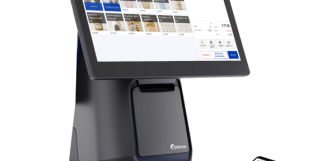
A typical POS setup might include a touchscreen terminal or tablet, a card reader, a receipt printer, and software that ties everything together. Crucially, some systems are now cloud-based, allowing you to access your business data from anywhere. It connects the moment of purchase with the rest of your business, giving you visibility, control, and efficiency all in one place.
What’s included in a POS system?
A POS system is made up of both physical hardware and digital software working together to help businesses process sales and manage operations efficiently. Here’s what you can expect to find in a POS system:
Primary POS hardware
-
POS terminal or touchscreen. This is the main device staff use to process transactions. Usually in the form of a touchscreen monitor, these are often PC-like, countertop devices. However, POS terminals can also be tablet-based, pocket-sized mobile devices, or self-service kiosks. They can even be laptops. In each case, the terminal (or terminals, as many businesses have more than one) will act as the central hub of the business, allowing staff to ring up sales and manage trade.
-
Card reader. Card payment terminals allow businesses to accept card payments, contactless payments, and mobile wallets like Apple Pay or Google Pay. These are essential as most payments are made via card, not cash. Any reputable card readers will offer fast, secure payment processing and will integrate with your POS terminal so the two devices can work as one. Payments will then automatically record and reconcile.
-
Cash drawer. While card payments continue to grow, many businesses still accept cash. A cash drawer securely stores coins and usually connects directly to the POS system, opening automatically during cash transactions to speed up service. They can also be used to store receipts and notes throughout the day’s trade.
-
Receipt printer. Many businesses offer email or SMS receipts these days, but customers often want printed receipts, which means a business still needs a receipt printer. In hospitality, printers can also be used to sync front and back of house, printing order tickets in the kitchen or at the bar.
-
Barcode scanner. Barcode scanners help businesses process sales much faster by instantly identifying products and prices. They also reduce human error and improve stock accuracy by linking directly to inventory management systems.
Common POS accessories
-
Customer display screen. A customer-facing display allows shoppers to view their items, totals, and track their sale. This improves transparency during checkout, but display screens can also be used to promote loyalty schemes, special offers, or branded messaging. If they’re touchscreen, they can also be interactive, allowing customers to input information for a customer profile or email receipt, or even answer questions about their experience.
-
Kitchen display systems (KDS). In restaurants and cafés, kitchen display systems can replace printed tickets with digital order screens. Orders are sent directly from the POS to the kitchen and can be updated as the order progresses, helping improve communication, reduce mistakes, and speed up service during busy periods.
-
Label and barcode printers. Businesses often use label printers to create shelf and product labels and barcodes. These tools are essential for retailers managing large inventories or businesses that manufacture and then sell packaged products.
What POS software includes
-
Sales and transaction management. First and foremost, POS software needs to process sales. It does this using software that links with the card payment software and business data to process baskets and checkout. It tracks payment methods, refunds, discounts, taxes, and receipts, helping businesses maintain accurate financial records throughout each day.
-
Inventory management. POS software should automatically update stock levels whenever products are sold, returned, or restocked. This reduces the need for manually counting everything on your shelves and in storage, and saves a lot of time wasted on data input. It also helps businesses avoid overselling, identify popular products, and know exactly when it’s time to reorder inventory so you don’t disappoint customers with stockouts.
-
Reporting and analytics. Any good POS system will give users insights into how their business is doing. Detailed reporting tools inform businesses on sales and product performance, busy trading periods, staff productivity, and customer behaviour.
-
Customer relationship management (CRM). Many POS platforms store customer information such as purchase history, preferences, and loyalty points. This allows businesses to build stronger customer relationships through personalised offers, rewards programmes, and targeted marketing.
-
Staff and employee management. POS software usually helps with payroll, security, and performance and shift monitoring. For example, managers can have different access levels, and once logged in, monies owed to each staff member update as they work, with transactions they process assigned in their name.
-
Cloud access and integrations. Cloud-based POS systems allow businesses to access data remotely from anywhere with an internet connection, even if you’re at the warehouse or on holiday. They also integrate with accounting software, eCommerce platforms, booking systems, delivery apps, and many other business tools to create a holistic system adapted the needs of the specific business using it!
What can POS systems help my business do?
Transactions
Whether customers are paying by cash, card, or mobile wallet, a POS system makes the checkout process fast, reliable, and secure. It automatically records each transaction, helping reduce manual admin and minimise human error.
Inventory
POS systems give you a live overview of your inventory, making it easier to avoid running out of popular items or over-ordering products that aren’t selling. Many systems can also alert you when stock is running low and generate purchase orders automatically, ensuring you never have empty shelves, and never get bogged down with your suppliers.
Business management
POS systems develop dozens of reports on all aspects of trade. These remove the need for data input and make it quick and easy to learn what you need to make informed business decisions. From selecting which products to prioritise, to pricing them correctly, to having the right number of staff on throughout the working week, POS reports make managing a business much easier and much more efficient.
Staff management
POS systems let you create accounts for each of your staff members. They then track activity so hours worked and wages owed calculate automatically. They’re also handy at helping managers with overseeing performance and evaluating staff, as well as improving security in the business as you can create accounts that limit access to certain functions or data. This helps improve accountability while simplifying day-to-day team management.
Customer management
POS systems allow businesses to digitise customer accounts, helping to improve and streamline a more personal customer experience. By attaching purchase history, preferences, and loyalty details to individual accounts, businesses can create personalised offers, reward repeat customers, and better understand buying behaviour. Over time, this helps strengthen customer relationships and encourage more repeat business.
What apps should I get to go with my POS system?
One of the biggest benefits of POS systems is their ability to integrate with other business apps, allowing businesses to adapt their existing setup to suit their needs, even as those needs evolve and the business expands.
Accounting apps
Accounting integrations are one of the most common business apps on POS systems. They sync financial data, including sales, refunds, VAT, and payment data, which flows from your POS into your preferred bookkeeping software. This saves time on manual data entry, improves accuracy, and makes financial reporting and tax preparation much easier.
ecommerce and delivery apps
ecommerce integrations connect your POS system with an online store, while delivery apps do the same for delivery platforms. These make it easy to run a multi-channel business without having to duplicate product pricing and stock levels, which update automatically across all channels, helping prevent overselling and removing the need to manage everything separately.
Loyalty apps
Loyalty apps help businesses reward repeat customers through points schemes, discounts, and personalised offers. By connecting directly to the POS system, customer rewards and purchase history are updated automatically after every transaction.
Marketing apps
Marketing integrations link businesses customer data with tools that make marketing quicker and more effective, whether it’s email campaigns, promotions, or targeted offers. This helps businesses reach customers with more relevant messaging based on their buying habits and preferences.
Booking and appointment apps
Booking integrations are a good example of industry-specific POS integrations (of which there are too many to list here!). Bookings are handy for businesses like salons, restaurants, clinics, and other service businesses. They allow customers to make reservations or appointments online while syncing directly with the POS system, helping staff manage schedules, payments, and customer information in one place.
What are the benefits of a good POS system?
Now that you understand precisely what a POS system is, let’s be clear about why they matter. Some of the biggest advantages a POS system brings to a business include:
-
Greater efficiency. POS systems bring all the threads of your business together and ensure they work smoothly, accurately, and in tandem, usually in real time to boot! They offer automation, and they don’t make mistakes, making your entire operation more efficient.
-
Easy adaptability. Through apps, through adjustable settings, and through hardware integrations, POS systems are highly flexible, and can be adapted to suit changing needs and more complex workflows.
-
Stronger customer service. Faster transactions, accurate stock and product information, and customer accounts all help staff provide a smoother and more personalised customer experience that helps you retain more of the people that step into your business as loyal customers.
-
Minimal data entry. Because information updates automatically across connected systems, businesses spend far less time manually entering data, whether that’s for managers or front-line staff. This not only saves time and reduces your payroll, but it also reduces the risk of human error.
-
Cheaper running costs. By automating tasks and improving efficiency, POS systems can help reduce labour costs, minimise stock waste, and avoid costly mistakes caused by manual processes.
-
The ability to scale as you grow. A good POS system can grow alongside your business, whether that means adding new staff, products, sales channels, or even a location. With the right system, you can do all of this without needing a new POS.
An essential for any business
POS systems have become an essential part of running a modern business, helping retailers, and hospitality venues manage everything from transactions and inventory to staff, data collection and business reporting, as well as customer relationships. By combining hardware, software, and integrations into one connected system, they improve efficiency, reduce manual work, and create a smoother experience for both businesses and customers. Whether you operate a single shop, a busy restaurant, or an expanding multi-location business, the right POS system gives you greater visibility, control, and flexibility. As businesses continue to evolve, POS systems provide the foundation needed to adapt, grow, and operate more successfully every day.
Frequently asked questions
- What does a POS system do?
-
A POS system helps businesses process customer payments and keep a smooth checkout. But they also do dozens of other essential tasks, bringing automation and efficiency to operations everywhere.
A good POS system will track the sales it processes, creating business reports and updating inventory automatically, manage staff activity and payroll, storing customer information and running loyalty programs. It will bring together business management tools into one connected system that improves efficiency and reduces manual work.
- What is an example of a POS system?
-
An example of a POS system, like Epos Now's, would be a business, like a cafe, that has a touchscreen terminal at the counter, with an integrated card reader for payments, a receipt printer, and perhaps a barcode scanner for a few products in wrappers. Beyond this hardware, the terminal will connect to a POS software account equipped with sales software and back of house business management tools, such as an online ordering system and accounting software.
- How to use POS as a cashier?
-
To use a POS system as a cashier, staff will have a user set up so their activity (such as hours worked for payroll) can be monitored. They use a passcode or swipe card to log in. Then, when customer approaches the checkout, they either scan products using a barcode or find the product on a hotkey. Once the basket is populated, they move to the checkout and select the relevant payment method, such as card, cash, or other. The POS system automatically calculates totals, applies discounts, records the transaction, and updates inventory levels, helping cashiers serve customers quickly and accurately.
- Is a POS system hard to learn?
-
Most modern POS systems are designed to be user-friendly, making them relatively quick to learn, which is important in industries with lots of staff that need to use it. Touchscreen, adaptable layouts, clear menus (with features like colour-coding on different kinds of products), and guided workflows help staff quickly figure out how to process sales, refunds, and other tasks.
- What are the top 5 cashier skills?
-
The top, most important cashier skills include:
- Communication
- Customer service
- Product knowledge
- Arithmetic
- Reliability
Cashiers need to be able to communicate effectively with colleagues and customers alike, providing friendly customer service even in difficult situations. They also need strong product knowledge to help answer questions and make recommendations. Arithmetic can help, too, although POS systems can do most of that for them. Finally, reliability is one of the best things for any staff member to have, in terms of punctuality, efficiency, and attitude.