Epos Now 3.45 Release Notes
Released 1 July 2026
MAJOR
- Network quality improvements for Epos Now Payments
- Collect customer feedback with reviews on receipts
ENHANCEMENTS
- Updated "Resend pay by link" experience
MINOR
- Phone number standards
- Historic data downloader
COMING SOON
- Epos Now Kiosk
- Revamping pay by link
- New payout invoices
- Create multiple-choice product groups with Sidekick
- Product variant improvements
- Passkeys
Network quality improvements for Epos Now Payments
- What is it? Improvements to resolve network instability between the Till and the payment terminal for Epos Now Payments customers, reducing errors during brief network drops
-
Why does it matter? Previously, brief network interruptions during transaction processing could trigger "lost connection" or "failed" error messages, even if the payment went through. This can cause confusion and manual checks. With the change, our payments are now resilient; they will intelligently wait a few seconds and differentiate between temporary network glitches and genuine card declines - resulting in fewer false alarms and a smoother checkout experience.
-
How do I access it? Make sure your Till is on the latest software version to access the improvements.
Updated "Resend Pay by Link" experience
- What is it? A better flow for resending payment links to customers
-
Why does it matter? You told us that it was difficult to resent payment links when they expire. We’ve made this more accessible within the customer page.
-
How do I access it? Access it via the customer page on the Till. It will be rolled out incrementally over the next few weeks.
Historic data downloader
-
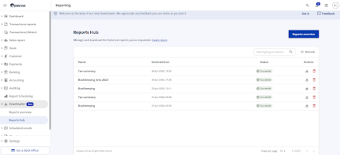
What is it? Download large historic reports (with data over 2 years old) in the background while you navigate the rest of the Back Office. Available reports include Bookkeeping, Tax Summaries, and Stock History.
-
Why does it matter? Business runs on data - we want to make your data more accessible without slowing you down. The tool gives you control with advanced filters for locations, devices, payment methods, and staff.
-
How do I access it? Navigate to Reporting > Transactions Report in your Back Office, and select Downloader from the left-hand menu. Generate a report, and you’ll be notified once it is available to download.
Phone number standards
-
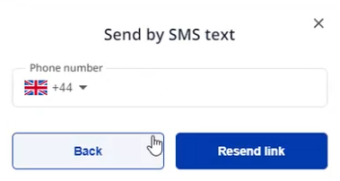
What is it? Improved management of international phone numbers within the multi-factor authentication flows.
-
How do I access it? The improvement has been added to your Back Office
Coming Soon
Big things are on the way! Here is a sneak peek at what is currently in development:
Extend the way you sell with Epos Now Kiosk
-
What is it? A clean, fast self-service checkout for your customers. Customers can browse, add, and manage their basket and pay without support. Available for hospitality with ticketing out of the box or retailers who want a straight checkout. You can control the entire experience via the Back Office. Use our Countertop 2 to get the best experience for our customers.
-
Why does it matter? Self-service kiosks give you a new way to service customers and reduce wait times. Let the orders come to you and have your team focus on delivery.
-
How do I access it? This feature will roll out soon for compatible devices.
Revamping Pay by Link
-
What is it? Pay By Link lets you take payment anywhere it suits you, including phone orders, invoices, or remote sales. However, it’s currently only available on the Till, and we heard that you needed more flexibility to send Links on the move.
-
Why does it matter? We’re adding payment links to the Back Office, giving you more freedom to send and manage them as you like. You’ll also be able to customise the link with your logo and send it directly or copy it into another channel.
-
How do I access it? Sign up to join the beta trial, which is happening shortly
New Payout Invoices
-
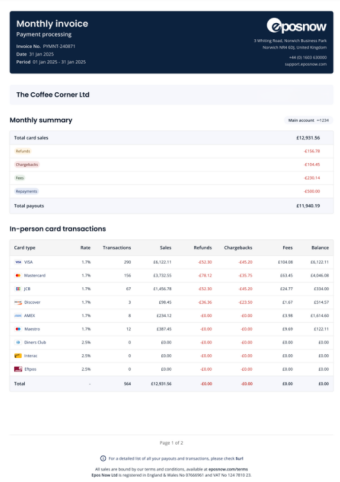
What is it? A modern, built-from-the-ground-up invoice layout designed to replace legacy financial reporting structures with a highly visual, transparent summary.
-
Why does it matter? It vastly simplifies the bookkeeping and reconciliation process. The new layout features an all-in-one financial summary (sales, refunds, chargebacks, fees, and net payouts), segmented transaction tables (categorising point-of-sale, online/Pay by Link, and phone orders), as well as splitting out your different locations and bank payouts.
-
How do I access it? The update will apply to your account after it is released.
Create Multiple Choice Product Groups with Sidekick
-
What is it? An integration with Sidekick, our AI assistant, allows you to instantly build and assign multiple-choice product variations (like sides, toppings, or add-ons).
-
Why does it matter? It removes the manual setup hassle, letting you configure complex menus and modifiers using simple AI chats
-
How do I access it? This will roll out soon. In the meantime, you can try existing AI features via the Sidekick interface in your Back Office.
Product Variant Improvements
-
What is it? A complete redesign of how product variants are built and organized in the system.
-
Why does it matter? It drastically simplifies the creation process, saving you time and reducing menu-management mistakes.
-
How do I access it? Updates will apply automatically to the item creation screen upon launch.
Passkeys
-
What is it? Passkeys provide more security than passwords using your FaceID / Fingerprint via your mobile device. We’re enabling this capability against our Back Office to ensure your account is always protected
-
Why does it matter? Log in to the Back Office more securely and quickly across every browser, Android, and iOS device.
-
How do I access it? Once rolled out, you will be able to configure it under My Account > Set up PassKey.