What is a Contactless Payment and How Does it Work?



These days, people want to pay quickly and easily. No more searching for cash or typing in a PIN. Just a simple tap, and they’re done. That’s why contactless payment is getting so popular.
As more New Zealanders tap their cards, phones and wearable devices to pay, Visa and Mastercard now account for around 74% of all retail payments in New Zealand, reflecting the continued shift towards contactless and digital payments. Plus, tap-to-pay transactions are up to 60% faster than chip-and-PIN payments.
So, how does it actually work? How can it fit into your POS system and existing payment processing solutions? Let’s break it down.
What are contactless payments?
So, what exactly are contactless payments?
It’s a way to pay without swiping. No inserting your card. No PIN. Just a tap, using your card, phone, watch, or another device.
It works with smart technology like RFID (radio frequency identification) and NFC (near-field communication) to process payments quickly and safely.
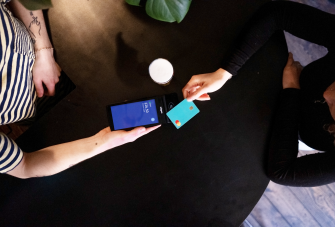
Customers simply tap their card or device near a POS terminal that supports contactless payments. This method, often called “tap-and-go,” is now a common feature in modern payment processing solutions, helping businesses speed up service and improve the checkout experience.
To learn more about the technology that contactless payments use, check out our complete guide: What is NFC payment?
How much does accepting contactless payments cost?
The good news? Accepting contactless payments doesn't cost more than accepting traditional chip-and-PIN card payments. Contactless transactions are processed at the same standard interchange rates as EMV chip transactions, so there's no additional fee just because a customer chooses to tap instead of insert their card.
The same applies to digital wallets like Apple Pay and Google Pay, which are also processed at standard card rates without any extra surcharge.
As for hardware, most payment terminals manufactured in recent years already support NFC contactless payments and may simply need the feature enabled. If you're upgrading your equipment, new NFC-enabled payment terminals typically cost between $350 and $950.
So, if you're already accepting card payments, adding contactless payments is often easier and more affordable than you might think.
A brief history of contactless technology
Contactless payments might feel new. But they’ve been around since the 90s.
At first, hardly anyone used them. Just a few shops. A few banks.
One of the first contactless systems launched in 1995 in Seoul, South Korea. The city’s transit authority introduced the UPass, which allowed riders to quickly pay for bus trips using contactless technology.
Then in 1997, the US got a taste. Mobil launched Speedpass. A little fob you tapped to pay for fuel. Across the Atlantic, in the UK, things really took off. London’s Oyster Card changed the game for commuters and by 2014, even credit and debit cards could tap in on the Tube.
New Zealand has been quick to embrace contactless payments, with tap-to-pay becoming a popular choice for both businesses and consumers. The COVID-19 pandemic further accelerated adoption as more people looked for faster, safer ways to pay without physical contact.
Now, it's absolutely essential to offer contactless payment options at your business.
How do contactless payments work?
So, how does contactless payment actually work? It’s pretty simple.
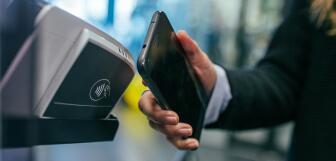
- Step 1: Customer taps their contactless card, smartphone, or wearable device near a POS terminal that supports contactless payments. Look for the little contactless payment symbol, it’s like a Wi-Fi icon on its side. If you see it, you can tap to pay.
- Step 2: The terminal uses NFC (that’s near-field communication) to read your payment info securely.
- Step 3: That information zips over to the payment processor. If it’s under the contactless limit, there’s no PIN, no signature.
- Step 4: Once it’s approved, the payment’s done. Your receipt, printed or digital, pops out.
Quick tip. If you’re thinking about adding contactless payments, make sure your credit card terminals can handle it.
Many customers now prefer mobile wallets like Google Pay, so knowing how to accept Google Pay on your POS system can help you cater to their needs and keep transactions quick.
Types of contactless payments
Contactless payments come in several forms, giving your customers plenty of easy ways to pay without cash or cards.
Contactless credit & debit cards
These are probably what most people think of first.
Contactless on a credit or debit card lets customers just tap their card on your payment terminal instead of swiping the magnetic stripe or inserting the card.
Mobile wallets: Apple Pay, Google Pay, Samsung Pay
Mobile wallets are apps that keep payment details safe on a phone or tablet.
With Apple Pay, Google Pay, or Samsung Pay, customers don’t even need their physical card.
They just hold their phone (or watch) near the credit card terminal, and that’s it, paid in seconds.
If you want to know how mobile payments can help your business run better, check out our article on how using mobile payments increases business efficiency.
Wearables: smartwatches, fitness trackers, key fobs
Wearables are devices people wear every day (like smartwatches or fitness trackers) that can also make contactless payments.
Instead of pulling out a phone or card, customers can simply tap their watch, smart ring, or key fob on your terminal. It’s really handy and growing in popularity, especially with people who like quick, hands-free payments.
Other emerging options: QR code-based solutions
Not all contactless payments use tap technology. Some newer methods use QR codes. Customers scan a code on their phone or at the checkout to pay. This option works well in places where NFC might not be available yet but you still want to offer a quick, touch-free payment method.
To get a clearer picture of all the ways your customers can pay, have a look at our guide on payment methods.
Payment processing services made simple
Take integrated payments at one fixed rate, with no hidden fees - anywhere, any time.
Why are contactless payments secure?
Contactless payments use advanced security features to keep transactions safe for both businesses and customers. Here’s how they protect everyone involved:
Tokenization and encryption explained
When you tap your card or phone, your actual card details don’t get sent.
Instead, a one-time digital code called a token is created for that payment.
It’s encrypted, so hackers can’t steal your payment information.
No need for physical swiping or chip insertion (reduces fraud risk)
Since there’s no swipe or chip insertion, there’s way less risk of card skimming or cloning.
Consumer protections (bank liability, payment limits)
Banks and other financial institutions back contactless payments with strong consumer protections. If a fraudulent charge happens, many banks take on the liability, not the customer. Plus, there are spending limits on contactless transactions to add an extra layer of security.
These combined security measures make contactless payment one of the safest secure payments options available today.
To learn how to make checkout easier and safer, see our guide on how to streamline payments.
Benefits of contactless payments for businesses and customers
Contactless payments offer real advantages that help both businesses and customers. Here’s why they’re becoming a must-have for retail and hospitality:
- Faster checkout speeds: Stores that use contactless payments see checkout times drop by 20–30%. Some can even finish a payment in under 10 seconds during busy times. This means you can serve more customers faster and keep lines moving.
- Reduced queue times and improved customer experience: Because of the faster checkout speeds mentioned above, lines move quicker and customers spend less time waiting. In fact, 67% of shoppers say they’re willing to abandon their purchase if the line is too long. Keeping checkout fast helps keep customers happy and less likely to walk away.
- Hygienic (especially post-pandemic): Contactless payments mean less touching of cash, cards, or PIN pads, which helps reduce the spread of germs. Since the pandemic, many customers prefer this safer, cleaner way to pay.
- Lower wear and tear on POS hardware: Because customers just tap or wave their card or device, there’s less physical use of the payment machines. This means your retail point of sale solution terminals stay in better shape longer, with fewer repairs or replacements needed.
How to accept contactless payments in your business
Here’s a quick checklist to get started with contactless payments:
- Hardware and software requirements: Use payment terminals or POS systems that support contactless technology and ensure your payment processing solutions can handle tap-to-pay transactions securely.
- Choosing a compatible POS system: Pick a POS system designed to accept contactless payments and other modern methods, so checkouts are fast and secure.
- Setting up digital wallets for acceptance: Enable NFC-compatible payment options like Apple Pay, Google Pay, and Samsung Pay by working with your payment provider. If you're also weighing up options like PayPal for your business, our guide to PayPal alternatives breaks down how the main providers compare.
- Employee training: Train your staff to recognize the contactless symbol, assist customers with tapping their cards or devices, and troubleshoot common issues.
For more tips on payment options and setup, see our guides on payment processing solutions and how to streamline payments.
Conclusion
That’s all from us! We’ve gone over how contactless payments work, the different ways your customers can pay, and why they’re good for your business. You also know what you need to get started and how to keep payments safe. Using contactless payments means faster checkouts and happier customers.
Ready to make checkout faster and easier? Discover how Epos Now payment processing solutions can help your business accept contactless payments smoothly and securely. Check it out today!
FAQs:
- What is the difference between contactless payments and mobile payments?
-
Contactless payments include any tap-to-pay method using a contactless card or device at a POS terminal. Mobile payments are a type of contactless payment made specifically through smartphones or smartwatches using apps like Apple Pay or Google Pay. Both use similar technology, but mobile payments rely on your phone or wearable instead of a physical card.
- How secure are contactless payment methods compared to chip cards?
-
Contactless payments are just as secure as chip card transactions. They use advanced security features like encryption and tokenization, making it hard for fraudsters to steal your card data. Plus, since there’s no physical swiping or inserting, the risk of card skimming is lower. Your card issuer also provides protections and liability coverage for unauthorized card transactions.
- Are there transaction limits for contactless payments in New Zealand?
-
Yes, contactless payments in New Zealand are capped at $200 per transaction without a PIN. This limit is consistent across major banks and card providers (ANZ, ASB, Westpac, Kiwibank), so for purchases of $200 or more, you'll be prompted to enter your PIN. Digital wallets like Apple Pay and Google Pay use device authentication such as Face ID or a fingerprint in place of a PIN.
- What devices and cards support contactless payments?
-
Contactless payment solutions work with a range of devices, including contactless credit and debit cards, smartphones, smartwatches, fitness trackers, and even some key fobs. Look for the contactless symbol, a series of curved lines, on cards or devices to know they support tap-to-pay.
- How can a small business start accepting contactless payments?
-
To accept contactless payments, small businesses need a POS system or card reader that supports contactless technology. Choosing the right payment processing solutions is key. You’ll also want to set up digital wallet acceptance for Apple Pay, Google Pay, and other mobile payment apps. Finally, train your employees on how to handle tap-to-pay transactions smoothly for customers.