Epos Now 3.47 Release Notes
Major
- Offline Mode for Epos Now Payments
Minor
-
New payout invoices
-
Expandable search new transitions report
-
Epos Now Payments quality upgrades
Coming Soon
- Reporting Dashboard
- Pay by Link revamp
- Pro+ 2
Keep taking payments, even when you're offline
- What is it? Offline Mode helps you keep trading when your internet connection is temporarily unavailable. If your payment terminal loses connectivity, you'll still be able to accept eligible card payments, which are securely stored and automatically processed once your connection is restored.
- Why does it matter? Unexpected internet outages don't have to bring your business to a standstill. Offline Mode gives you added resilience, helping you continue serving customers and taking payments when connectivity is interrupted.
- What do I need to know? To help manage risk, Offline Mode initially supports a maximum of 10 offline transactions, with a default limit of £20 (or local currency equivalent) per transaction. Because payments can't be authorised until your terminal reconnects, some transactions may later be declined if the card has insufficient funds, has expired or has been reported lost or stolen. You can find full details, including eligibility, supported payment methods and how to request different limits, in our Offline Mode Support Guide.
- How do I access it? Offline Mode is available for eligible Epos Now Payments merchants. If you'd like to enable it for your business, register your interest below, and we'll be in touch to discuss eligibility and activation.
New, Easier to Read Epos Now Payout Invoices
- What is it? We've redesigned your payout invoices to make them clearer, more organised and easier to understand, giving you a complete view of your payments in one place.
- Why does it matter? Spend less time reconciling your accounts. Your new payout invoices provide a clear summary of sales, refunds, chargebacks, fees and net payouts, while organising transactions by payment type, location and bank payout - making bookkeeping and financial reporting much simpler.
- How do I access it? The new payout invoices are available now and will automatically appear in your account.
Find transactions faster with enhanced search
- What is it? We've expanded the search functionality in the New Transactions Report, making it easier to find exactly the transaction you're looking for. You can now search using 14 different fields, including customer and staff names, product names, transaction IDs, barcodes, table names, ticket numbers, totals, tax, discounts and SKUs.
- Why does it matter? Whether you're checking a past sale, resolving a customer query or investigating a transaction, you can now find the right record in seconds - saving time and reducing the need to manually search through your transaction history.
- How do I access it? Open the New Transactions Report in your Back Office and use the search bar to start searching. Select the information icon beside the search field to see the supported search options, or visit the Knowledge Base for full search guidance.
Epos Now Payments quality upgrades
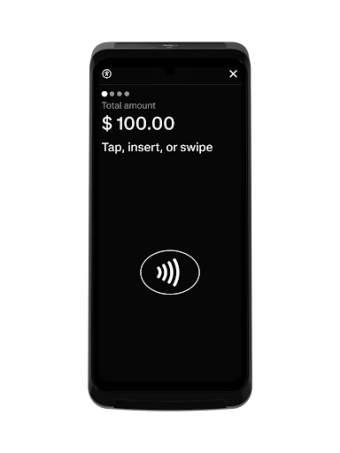
- What is it? We're upgrading the technology that connects Epos Now to your payment terminal, making card payments more reliable and improving communication between your POS and terminal.
- Why does it matter? A more resilient cloud-based connection means fewer interruptions, faster payment processing and a smoother checkout experience for your staff and customers. It also helps us identify and resolve issues more quickly, so if something does go wrong, we can get you back up and running faster.
- How do I access it? No action is required. This upgrade is being rolled out automatically as part of this release, so you'll benefit from improved payment reliability without changing the way you work.
Coming Soon!
A smarter way to understand your business
Available in Beta
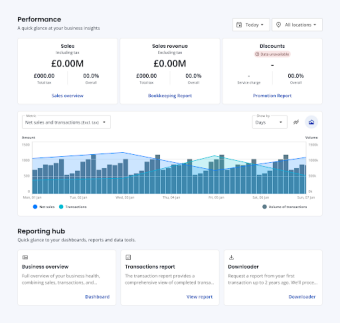
- What is it? We're introducing a brand-new Reporting Dashboard that puts your most important business insights front and centre. View key performance metrics at a glance, compare trends with interactive charts and quickly jump to your most-used reports; all from one place.
- Why does it matter? Understanding how your business is performing shouldn't require digging through reports. The new dashboard gives you instant visibility into sales, revenue, discounts and other key metrics, helping you spot trends faster and make confident decisions with less effort.
- How do I access it? The new Reporting Dashboard is currently available to customers enrolled in our New Dashboards Beta.
Not part of the beta yet? Join today by enabling the beta from the Transactions Report page here and be among the first to try new reporting features. As you explore the dashboard, we'd love your feedback to help shape future improvements.
Manage Pay by Link from anywhere
- What is it? We're bringing Pay by Link to the Epos Now Back Office, making it easier to create, send and manage payment links wherever you're working. Whether you're taking deposits, processing phone orders, sending invoices or collecting outstanding payments, you'll soon be able to do it all without needing access to your Till.
- Why does it matter? Managing remote payments is about to become simpler and more flexible. You'll be able to create payment links, monitor their status, expire links you no longer need and manage everything from one place. Plus, payment links will no longer depend on your Till being online, giving you a more reliable way to request and track payments.
- How do I access it? We're launching this feature in September, initially through a limited beta with existing Pay by Link customers. If you'd like early access, register your interest below and we'll be in touch if your business is selected to take part.
Faster payment devices - Pro+ 2 is coming soon
We’re looking for merchants to help us test the next version of our Pro+ device, the Pro+ 2. The upgrade is 3x faster and we’ve improved the network connectivity to keep you trading all day long.
Sign up and join the beta trial, starting next month!