Epos Now Payments: The Complete Guide



Fortunately, Epos Now POS systems come with an in-house card payment provider, which makes getting card payments to work that much easier, because the two tools are designed to go together. Great! And there are all sorts of advantages to Epos Now Payments, which we’ll discuss later on.
However, to get the most out of any technology you need to know how it works. So here and now, we’re giving you the full scoop on Epos Now Payments so you can ensure your business gets the full benefit. We’ll cover:
-
Setting up your Epos Now Payments device
-
Taking payments
-
Using offline mode
-
Reading your payout reports
-
Payout options
-
The advantages of using Epos Now Payments
-
Handy Payments resources
If there’s anything here that’s most pressing, give it a tap and skip ahead. If not, read the blog through and by the time you’re done, you’ll be a Payments expert! Let’s get started.
Setting up your Epos Now Payments device
Hardware setup
The exciting day your Payments device arrives and you open the box, you should find a few predictable items inside:
-
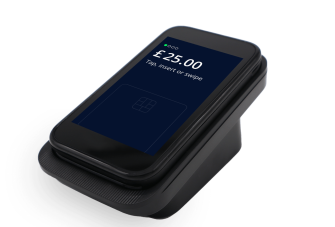
The device itself (either a Pro+, Air, or Link device, depending on your order)
-
A charging dock (unless you bought the static Link, which doesn’t need one!)
-
Charging cable to connect the dock (or the Link) to the mains
-
Printer roll (Pro+ only)
Naturally, the first thing to do is put the plug in the mains to power either the charging dock or the Link, depending on which device you’re using. Once connected to power, the device will turn on automatically.
Simple enough so far!
After selecting your language, you’ll need to connect your device to the internet. So, select WiFi (toggle the WiFi on if necessary) and select + to scan for networks. Your network should appear, and as with any other device, all you’ll need to do is enter your password and get yourself connected.
Once online, you should be able to board your terminal. To do this, you’ll need to select the site or store location you’re at. The device will search for your store and it should appear on screen, if the address matches, then confirm the store to complete your hardware setup!
Note: Once boarded to your store, the device will restart automatically and download any necessary updates, so leave it be for a little while as it completes this process!
To integrate your device into your POS, go to your settings on the front till, go to Payments and toggle Epos Now Payments on, and don’t forget to cloud sync to update your settings!
Back office setup
Setting your device up in the back office is straightforward enough. Just go to eposnowhq.com, and head over to Setup > Locations and edit the location you’ll be using the device at to ensure the right bank account is selected (you should have your bank account setup in your payments portal).
Next, on the left hand navigation, select Payments > Terminal Setup. Your device/s should appear on screen (You can identify them through their serial numbers if you have more than one). Name your device to make it easy to identify in future, then assign to the location it will be used at.
Once you’ve done all this, your Epos Now Payments device should be ready to go.
Still having issues? Take a look at the Epos Now Payments support guides in the Back Office.

Taking Payments
Once integrated, taking payments on an Epos Now Payments device is painless. You select card at checkout, and the card machine will ask the customer to present their card, showing the amount they’re paying for, which will match the basket on the POS. When the customer uses their card to pay, the card machine will prompt the transfer of funds and triggers the completion of the sale back on the POS.
Taking a standalone payment
Even when integrated, your Payments device can process a payment independently if you hit the payment icon in the bottom right corner and enter the amount!
Adding a tip option to payments
If you want to add tip options during card payments, you’ll need to download the gratuity app from the Back Office AppStore, which you can find by searching gratuity or going to app number 209.
If you have the gratuity app installed, your card machine will automatically ask if the customer wants to tip before processing a sale!
Completing your End of Day
With an integrated Payments device, your card machine constantly communicates with your POS system, operating as one. An advantage of this is easier end-of-day reconciliation.
When you finish trading and go to close your till, the system will present you with expected takings. You count the cash in your cash drawer and hope it matches. But when you get to the card reader, there’s no need for hope, there’s only one correct figure, making your end-of-day process that little bit easier!
Not feeling confident about completing your End of Day? Learn the best way by watching our End of Day video guide!
Offline mode
In London, New York, Sydney, or way out in the outback, you can’t always guarantee WiFi connection. But one way or another, you need to guarantee your customers you can make the sale they need. So how can you do that? By falling back on offline mode!
Enabling Epos Now Payments offline mode allows you to take the card and payment information, store it during the period without internet, then process the payment after that delay.
Note: It’s important to be aware and accept that because the payment information is stored locally at the time of payment, the balance and account checks cannot be carried out, increasing the risk of payment issues such as insufficient funds or declined card after the payment has left with their purchase.
Offline mode is a non-integrated checkout, which means you process the sale on the till and card machine separately. To complete this sale:
-
Insert the products you want to check out into your basket
-
Select ‘Pay’
-
Process the payment on your card terminal
-
Record the transaction on the till using the ‘Epos Now Standalone’ tender type
Your device can store up to 10 offline transactions, so it’s important to work to get your system back online as you take these sales. The transaction limits are set to £20 (or currency equivalent), but you can request both these settings changed by submitting a form found on the offline mode guide.
Using a Pro+? Because the Pro+ device is an all-in-one card machine and POS, offline mode looks the same as online mode!
Reading your payout reports
Knowing how much money reached your account at what time can be crucial when managing cash flow, paying bills, payroll, and the many other moving parts of your business finances. With Epos Now Payments, you can track when money from card payments reached your business account.
Your Payments reports are in the Back Office under Payments > Payments Payouts. There are two reports, one showing the total list of payouts paid to you, and the other showing the card sales you made that are included in that payout.
The first one displayed is the list of payouts, with the date and amount displayed, as well as an individual payout ID to help with your accounting. If you want to see the transactions included in each payout, select one from the list and the report will display each transaction with its corresponding reference, date and time of sale, and the amount before and after transaction fees.
Want to export your reports? They’re all downloadable in .CSV form!
Note: If you can’t see your payments reports in your Back Office, make sure you’re not using a sub-login, and switch your browser to Google Chrome.
Your payout options
If you’re finding your money isn’t reaching you quick enough, Epos Now Payments offers users two ways of speeding up payments: Faster payouts and Cash Out, which offer a quicker of your funds, giving you total control over your Payments.
As standard, you’ll receive the money from a card sale before 5 PM the next day. For example, each payout you make before midnight on a Monday will reach your business account before 5 AM on the Tuesday.
If you need the money sooner, upgrading your payouts will allow you to set a payout time that suits your needs, and the money from the previous 24 hours of sales is guaranteed to be in your account two hours after that time. For example, if you go to your wholesaler at 11 AM on a Wednesday, set your payout time for 9, and you’ll have the money to pay for your inventory.
Tired of waiting around? Epos Now Cash Out does away with all the waiting and sends the money from a card sale straight to your bank account. By the time your customer gets home after they leave, you could already be spending the money from the sale!
The advantages of Epos Now Payments
In all the nitty-gritty of setting up payment system and learning where to go for what report, it’s easy to lose sight of what’s so great about an Epos Now Payment system. Just to make sure you don’t forget, let’s recap a few of the reasons Payments works so well for so many businesses:
-
Built to work seamlessly with your POS. Because Epos Now Payments is designed specifically to integrate with Epos Now POS systems, setup and day-to-day use are incredibly straightforward, especially when compared with awkward third-party integrations. Your card machine and till communicate intuitively in real time, reducing manual input, minimising errors and any hold-ups at checkout.
-
Faster, simpler end-of-day reconciliation. With your card payments and POS working in tandem, your POS knows what’s been going through your card machine, meaning that when you stop trading your card totals are automatically reconciled. That means less time spent manually matching receipts and fewer discrepancies to investigate at the end of a busy trading day.
-
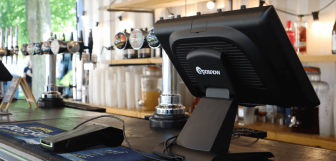
Adaptable payment hardware. Your business has its own needs. The countertop Link, lightweight and portable Air, and the all-in-one handheld POS and payments Pro+ ensure you can get the kind of card machine that fits those needs. This flexibility makes it easy to tailor your setup to how you trade!
-
Reliable payments, even when things go wrong. Offline mode gives your business peace of mind, knowing that an internet outage won’t stop you trading, even if you’re cashless. You can troubleshoot your internet even as your team keep processing sales.
-
Quick access options for your money. Epos Now Payments doesn’t leave anyone waiting around, as standard payouts already arrive the next day. But if you want them sooner, that’s not a problem, with faster payouts and Epos Now Cash Out options giving businesses even more control over cash flow, including earlier and even instant payout options. Whether you’re paying suppliers, buying stock, or managing payroll, having rapid access to funds can make a real difference to your day-to-day.
-
Transparent reporting. Your payout reports in the Back Office make it easy to track money from the start to the end of its journey through your business, which is every accountant’s dream, right? You can monitor transaction fees, and see the transfers drop into your bank account, with clear and adaptable payout reports.
Handy Payments resources
If you still have questions about Epos Now Payments, whether you already use them or not, Epos Now offer users lots of resources to make learning about your sales tech as easy as possible. Want to speak to a member of our support team? Just head over to the Support Centre where you can call, contact LiveChat, or ask your questions to SideKick, Epos Now’s AI Chatbot.
Want to read more? Here are some other Payments guides:
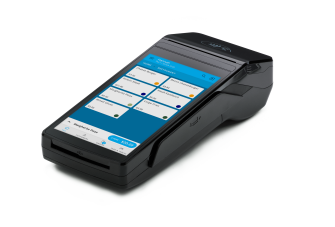
Pro+
Portable card machine with real-time reports and integrated POS system. Fully PCI compliant.
Link
Stationary device with fast payments and real-time reports using Epos Now POS software.
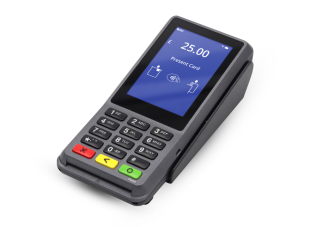
Air
This is a light and pocket-sized portable device. Real-time reports are available using Epos Now POS software.