What Is a Handheld POS System and Why Use One?



Why use a handheld POS system? What are they? Which industries really benefit from them? These are all questions we’ll be looking at today as we take a closer look at the handheld POS industry and establish what they really offer the businesses that come to rely on them. We’ll cover:
-
What is a handheld POS system?
-
What features do handheld POS systems typically offer?
-
Pros and Cons of handheld POS systems
-
Handheld POS versus fixed POS
-
Which industries are taking to handheld POS?
If you’re thinking of investing in some handheld technology for your business, this blog offers you a way of weighing up the argument. So let’s crack on with our run-through of handheld POS!
What is a handheld POS system?
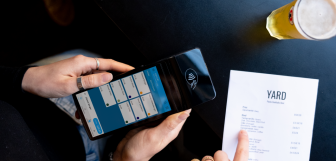
A handheld POS system is a portable device, which could be an adapted card terminal, a tablet, mobile phone, or any other lightweight terminal, that lets staff take orders, look up products, prices and stock, and accept payments from anywhere on the shop or restaurant floor. No counter, no cables, no queue!
Before handheld POS came along, checkouts were fixed to one spot. Either customers had to physically bring items to a counter, and staff had to run back and forth to check prices or stock, or staff had to go to the customers, take orders to and from the counter, and even take the customers' cards away from tables (like in the hospitality industry). It all worked, but it wasn't fast, and it definitely wasn't flexible.
Handheld POS started gaining real traction in the 2000s, as smartphones and tablets got cheaper and payment card technology (chip-and-PIN, then contactless) matured enough to go mobile. Retailers and restaurants quickly saw the appeal of a till that could move with the business rather than the other way round. More recently, portable card machines have become more sophisticated, adding more features, including point of sale technology, so entire businesses can be run through handheld POS devices (which has transformed some industries, which we’ll talk about later on).
Handheld POS is not a niche trend anymore. The market was valued at USD 32.91 billion in 2025 and is projected to grow to USD 36.23 billion in 2026, on its way to USD 78.25 billion by 2034. That's roughly 10% growth a year, and it's only accelerating as more industries realise queueing customers at a fixed counter is starting to look a bit old-fashioned.
What features do handheld POS systems typically offer?
Not all portable POS are created equal, but most share a common set of features that make them worth the investment. Below is what you can look for in a good system:
-
Mobile payment processing. Most importantly, being able to accept chip-and-PIN, contactless, and mobile wallet payments (Apple Pay, Google Pay) on the spot, wherever the customer happens to be standing, is a crucial feature. This cuts out the walk to a till entirely, which matters just as much in a packed restaurant as it does for a retailer. It’s essential, too, for mobile and pop-up businesses.
-
Inventory lookup. Check stock levels in real time without a trip to the back office, so staff can tell customers instantly whether an item's available, in stock elsewhere, or due back in soon. That kind of immediate answer can be the difference between a sale and a customer walking away. Being able to find out quickly gives them confidence in the business, even if the answer’s a no.
-
Order taking. Especially useful in hospitality, letting servers punch in orders tableside and send them straight to the kitchen builds efficiency into the business and makes life much easier for the staff. It also reduces the errors that creep in when orders are scribbled on paper and interpreted (or misinterpreted) by a second person later.
-
Barcode/QR scanning. Built-in scanners speed up checkout for retailers and reduce manual entry errors. Some portable POS systems offer scanners, but these are slightly less common across the industry. But for the right business, this is key.
-
Receipt options. Unlike scanners, all portable POS systems should offer receipt options, either with software that offers emails or texts, or built-in receipt printing hardware.
-
Customer relationship management (CRM). Being able to access customer accounts, with purchase history, loyalty points, and preferences to help personalise the interaction, all help provide a warmer, more friendly service, as well as a convenient one. Whether that's recommending a product they've bought before or flagging a loyalty reward they're close to earning, CRM turns a routine transaction into a more tailored experience.
-
Cloud syncing. POS systems often rely on a cloud for more reliable, secure data storage. But a remote device will need to connect to the cloud through WiFi to access the latest data and upload sales and inventory changes. This ensures sales, stock, and staff records stay consistent business-wide. This is particularly valuable for businesses juggling multiple handhelds or several sites, where mismatched data can quickly cause confusion.
-
Offline mode. Many portable systems keep working even if Wi-Fi drops, queuing transactions locally and syncing them automatically once connectivity's restored. It means a shaky signal doesn't bring the whole system crashing down, losing sales and reputation.
-
Reporting and analytics. Track sales trends, staff performance, and peak times straight from the palm of your hand, no separate software needed. Having that data on tap makes it easier to spot what's working, adjust staffing, or catch problems before they grow, even as you scour your site for new sales.
-
Multi-location support. For businesses with several sites, handheld POS can centralise data so managers get a single, unified view of sales, stock, and staff activity across every location, rather than having to check each site separately.
Together, these features turn a simple handheld device into a genuine extension, or even replacement, for the fixed checkout, letting staff serve customers properly wherever they happen to be, rather than tying everyone to one spot in the shop.

Pros and cons of handheld POS systems
Like any investment, handheld POS can help businesses improve their services, but they also have some drawbacks it’s important to acknowledge before you invest. Let’s weigh them up now.
Pros:
-
Faster service. With a mobile POS, staff can take payments and orders anywhere, speeding up turnover. During busy periods, this can be the difference between a customer waiting patiently or giving up and walking out.
-
Improved customer experience. Meeting customers where they are, whether that's on the shop floor or at their table, is more personal and modern than herding them towards a checkout. It also opens the door to more natural conversations about products or add-ons, not to mention it’s more convenient for them.
-
Space-saving. No need for bulky fixed counters. Handheld POS reduces the demand for counters and checkouts, freeing up valuable floor space that can be used for more stock, seating, or displays instead. For smaller premises especially, this can make a real difference to capacity, layout, and flow.
-
Flexibility. Ideal for pop-ups, markets, and events where a fixed till simply isn't practical. Handheld POS travels with the business, and just needs a pocket, bag, or holster, so seasonal stalls or one-off events don't require separate infrastructure.
-
Line-busting at peak times. When queues get too long, staff can step out from behind the counter to serve waiting customers directly, taking payments on the spot rather than making everyone funnel through one queue.
Cons:
-
Smaller screen size. Compact displays can make some tasks fiddlier than on a full-sized terminal, particularly for staff entering complex orders or navigating detailed menus.
-
Battery and connectivity issues. Going wireless means relying on battery, and a dead device or dropped signal can bring your business to a halt. When relying on handheld POS systems, you’ll need to pay attention to battery and connectivity.
-
Security risks. Unlike fixed POS, portable devices are more easily lost, stolen, or damaged, which raises risks, insurance costs, and the chance of interrupted service in the event of a missing POS.
-
Fewer features. Handheld POS doesn't always match fixed terminals for software and hardware capability. It can be harder to complete certain tasks on these smaller devices, especially if the device doesn’t have a built-in barcode scanner or receipt printer.
Handheld POS versus fixed POS
Mobility and flexibility
Handheld POS wins hands down here. They are designed to be fully portable. Staff can process transactions anywhere on-site (and in some cases, with built-in WiFi or a portable hotspot, they can go anywhere at all), whether that's tableside, on a shop floor, or at an outdoor event. Fixed POS offers none of this. They are tied to one location, and can be a lot of work to move, even temporarily, away from the counter. This works fine for predictable footfall and an established system, but would be a huge struggle for pop-ups, queues, or spread-out spaces.
Hardware and processing power
Fixed terminals typically pack in more hardware: integrated cash drawers, receipt and label printers, bigger screens, and sturdier builds designed for constant daily use at one station. Handheld devices, being smaller and battery-powered, have to compromise on this front, and can't typically match that same depth of built-in functionality.
Reliability
Fixed POS systems can be more dependable, since they're not as vulnerable to being dropped and knocked around, and are built heavier and sturdier, both in terms of hardware and software. Handheld systems are more exposed to dropped connections, flat batteries, and physical damage from being carried around.
Cost and setup
Handheld systems often work out cheaper to purchase and easier to set up, particularly for new businesses that won’t need to create a counter setup or extensive wiring. Fixed POS can mean higher upfront investment but may prove more cost-effective long-term for high-volume, single-location operations.
Customer experience
Handheld POS generally offers a more personal, flexible service style, letting staff engage with customers directly rather than funnelling them to a counter. Fixed POS, however, can offer quicker service at the counter, as the counter can have all the tools and access staff need to serve at speed. Fixed POS therefore suits environments where a clear, structured checkout point feels more appropriate, such as large supermarkets.
Which industries are taking to handheld POS?
Handheld POS has found genuine traction across a range of sectors, each drawn to it for slightly different reasons:
-
Hospitality. Restaurants, cafés, and bars are some of mobile POS’s biggest fans. They all use handheld POS to take orders tableside and send them straight to the kitchen, speeding up service, reducing errors, and freeing servers and guests from constant trips back to a fixed till.
-
Retail. Shops use handheld devices to check stock, process payments on the floor, and cut queues during busy periods, particularly useful for larger stores or seasonal peaks like sales events.
-
Events and markets. Pop-up stalls, festivals, and markets rely on handheld POS for its portability and the compact setup they offer, letting vendors take payments anywhere without needing fixed infrastructure or permanent counters.
-
Quick-service and food trucks. Fast-turnover businesses benefit from handheld systems that let staff take orders and payments on the move, keeping lines short even in tight spaces.
Mobile point of sale: an easier way of moving forward
Handheld POS, portable POS, mobile POS, or even MPOS, has come a long way from its early days, growing into a market worth billions and still expanding fast. It brings genuine advantages: faster service, more personal customer interactions, and the flexibility to sell from anywhere.
But it isn't without trade-offs, from smaller screens to fewer built-in features compared to fixed terminals. Whether it's the right fit depends on your business, its space, and how customers move through it. Hospitality, retail, events, and healthcare have all found real value in going handheld. For many businesses, it's simply a more flexible way of moving forward!
Frequently asked questions
- What is a handheld POS?
-
A handheld or portable POS is a mobile device, usually something slightly larger than a mobile phone, that lets staff take orders and sales, look up stock, and process payments away from a checkout counter. Unlike fixed tills, it isn't bound to one place, making it particularly popular in hospitality and events where mobility, speed, and convenient service matter.
- What is the main purpose of a POS system?
-
POS systems are complex and multi-purpose. They serve dozens of key functions, including stock and product management, data collection and report generation, customer account creation and management, payroll management, not to mention the integration options that expand the list to the implementation of loyalty programs, e-commerce and delivery, and many more services.
But without sales, a business soon falls apart, and POS systems main purpose is to make it quick and easy to checkout at a busy, tallying products into a basket and linking to a payment processor to take card payments. This is the most important function of a POS system.
- What are 5 types of POS systems?
-
Common types of POS systems include:
-
Fixed, countertop
-
Handheld/mobile (portable devices)
-
Tablet-based POS (These often work as a hybrid between fixed and portable POS)
-
Self-service kiosks (customer-operated checkout)
-
Cloud-based POS (Which any of the above four could also be, but is the common approach now, taking the place of local data storage)
Each suits different business models, from quick-service restaurants to large supermarkets.
-
- Can I use my mobile as a POS machine?
-
Yes, many mobile POS systems let you turn a smartphone into a checkout station using dedicated software-only services and, often, an attachable card reader. This makes it an affordable and extremely practical option for new or small businesses, market stalls, or anyone needing a flexible, low-cost alternative to a fixed terminal.
- What is the difference between a POS and a mobile POS?
-
Mobile POS is not different from POS but a type of POS. Typically, POS systems come as a fixed, countertop terminal, the kind you see in most retail and hospitality businesses at their checkout. The only difference with mobile POS is portability, which lets staff process transactions anywhere on-site.
- Can POS work without internet?
-
Yes, but this depends on your setup. Many handheld and mobile POS systems include an offline mode, allowing transactions to be processed and queued locally even without a connection. Once Wi-Fi or mobile signal returns, the data syncs automatically, meaning a dropped connection doesn't have to bring service to a complete stop.
Some POS systems also operate through local storage by design, though this is no longer the market norm. If this is something you would like, make sure you find a POS system that isn’t cloud-based.