Epos Now 3.46 Release Notes
Released 21 July 2026
MAJOR
- Faster card payments when internet goes down
- Early Capital Renewals
- Create Multiple Choice Product Groups with Sidekick
MINOR
- New Payout Invoices (Coming in August)
- Clearer payment progress for staff
- Data downloader In-App Notifications
- Product Variant Improvements
- Passkeys
- New Transactions Report - Tender Type split
- Improvements and fixes
COMING SOON
- Collect Customer Feedback with Reviews on Receipts
- New Transactions Report - Expanded searchable field
- Revamping Pay by Link
- Bookings app upgrades
Faster card payments when internet goes down
-
What is it? We've made card payments smarter when your Till loses its internet connection. Instead of trying to connect to a broken network, now the till realises it's offline immediately and instantly processes the payment using its local backup.
-
Why does it matter? This stops the screen freeze that used to happen during internet drops. Your Till will instantly skip the wait, letting you keep taking card payments and serving customers without a hitch. Once your internet comes back, the system automatically goes back to normal for the next sale.
-
How do I access it? This feature will be automatically applied once your Till is updated to the latest software version.
Early Capital Renewals
-
What is it? The option to renew business funding early if your capital advance is provided by Adyen.
-
Why does it matter? It allows you to maintain business momentum and secure fresh growth capital right when you need it, rather than waiting until the previous grant is 100% repaid.
-
How do I access it? From 27th July, eligible Adyen Capital users will see early renewal offers appear in their Capital dashboard.
Create Multiple Choice Product Groups with Sidekick
-
What is it? An integration with Sidekick, our AI assistant, allows you to instantly build and assign multiple-choice product variations (like sides, toppings, or add-ons).
-
Why does it matter? It removes the manual setup hassle, letting you configure complex menus and modifiers using simple AI chats.
-
How do I access it? This will roll out soon. In the meantime, you can try existing AI features via the Sidekick interface in your Back Office.
New Payout Invoices (Coming in August)
-
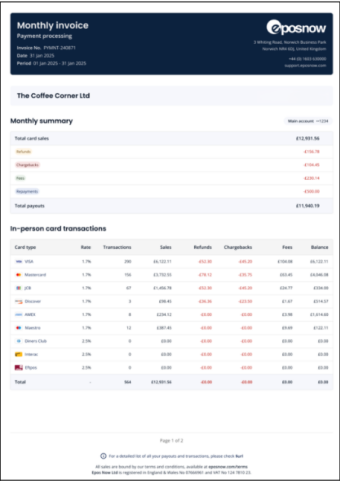
What is it? A modern, built-from-the-ground-up invoice layout designed to replace legacy financial reporting structures with a highly visual, transparent summary.
-
Why does it matter? It vastly simplifies the bookkeeping and reconciliation process. The new layout features an all-in-one financial summary (sales, refunds, chargebacks, fees, and net payouts), segmented transaction tables (categorising point-of-sale, online/Pay by Link, and phone orders), as well as splitting out your different locations and bank payouts.
-
How do I access it? The update will apply to your account after it is released.
Clearer payment progress for staff
- What is it? New payment prompts on the Till when completing a transaction, including an elapsed timer and text describing the stage of the payment.
- Why does it matter? Previously, it was difficult for staff to tell if a payment was stuck or just waiting on the customer. By replacing generic loading text with clear, live updates these changes remove the guesswork and prevent accidental or premature cancellations.
- How do I access it? These visual improvements will automatically apply to the payment processing screen once your Till is updated to the latest software version (v1.108).
Data downloader In-App Notifications
- What is it? Beta Data downloader now supports multilingual menu text, and the generated reports are now described by name.
- Why does it matter? You can identify better your reports generated and set any language of your choice.
- How do I access it? Visit the Data Downloader.
Product Variant Improvements
-
What is it? A complete redesign of how product variants are built and organized in the system.
-
Why does it matter? It drastically simplifies the creation process, saving you time and reducing menu-management mistakes.
-
How do I access it? Updates will apply automatically to the item creation screen upon launch.
Passkeys
- What is it? Passkeys provide more security than passwords using your FaceID / Fingerprint via your mobile device. We’re enabling this capability against our Back Office to ensure your account is always protected.
- Why does it matter? Log in to the Back Office more securely and quickly across every browser, Android, and iOS device.
- How do I access it? Once rolled out, you will be able to configure it under My Account > Set up PassKey.
New Transactions Report - Tender Type split
- What is it? New transactions report now show in the Transaction Details the split of total amount paid by Tender type.
- Why does it matter? You can check the split by tender in each transaction. Helping you to reconcile better your transactions and accounting systems.
- How do I access it? You can see the details of each transaction just by clicking it in the table.
Improvements and fixes copy
-
On some devices we’ve seen Pay By Link transactions being duplicated in the Back Office reporting. This has now been fixed.
-
We have fixed an issue where two card tender buttons appeared on screen at the same time for Spanish language accounts.
Coming Soon!
Collect Customer Feedback with Reviews on Receipts
-
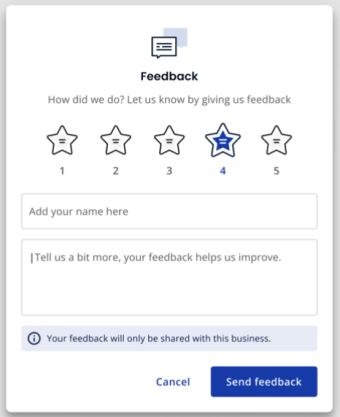
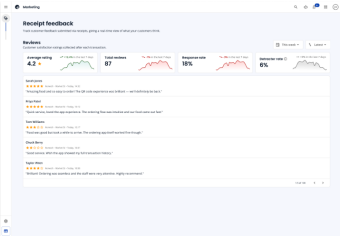
What is it? Get direct customer feedback via a QR code on a physical receipt or URL on digital receipts, allowing customers to instantly rate their experience and leave feedback while their visit is still fresh in their mind.
-
Why does it matter? Your reviews aren't a vanity metric. They're where buying decisions happen before a customer walks in or lands on your site.
93% of consumers read reviews before buying, and 54% trust them more than word of mouth.
For restaurants, a 1-point rating increase can lift revenue by 5–9% and reservations up to 18%.
For retailers, five-plus reviews can boost conversion by up to 270%, with customers spending around 31% more.
-
Happy customers rarely think to leave a review on their own — the ask has to land at the right moment. Reviews also drive local rankings directly: they make up 15% of Google's Local Pack algorithm, and 70% of consumers won't trust a business with fewer than four reviews.
-
How do I access it? This feature is completely free. You can enable it on your account by visiting the marketing settings and activating the ‘Show receipt feedback QR code’ toggle.
New Transactions Report - Expanded searchable field
-
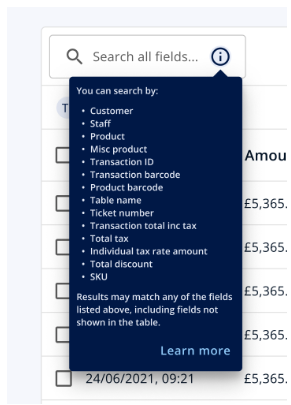
What is it? We have listened to your feedback about the new transaction report and have incorporated new ways to search your transactions. You can now search through 14 different fields.
-
Why does it matter? Helps you find the transaction you need easily and quickly!
-
How do I access it? Simply utilize the search bar on the new transaction report; you can hover over or click the “i” icon to view the full list of searchable fields. For any questions regarding its usage, please consult our Knowledge Base in our support centre, where you can find details on both supported and unsupported queries across all fields.
Bookings app upgrades (coming soon)
Smart Scheduling and Slow Optimisation
-
What is it? Providing insights to your booking dashboard giving you recommendations on how improve.
-
Why does it matter? Understanding trends in your bookings and cancellations can help increase revenue and ensure you don’t overload staff.
-
How do I access it? Ensure that your Bookings has data from the last 30 days and visit the Availability page within Settings to access your insights.
Branding Control
-
What is it? Personalise your Booking page with your images, colour themes and more.
-
Why does it matter? Make merchants feel at home when they good and improve conversion.
-
How do I access it? Use the branding tab within settings to personalise your page.
Core improvements
-
What is it? Core improvements including adding booking refunds, telephone number validation and a better search capability.
-
Why does it matter? Making booking faster, improving quality and refunding your customers if there is an issue.
-
How do I access it? This is within your customer booking page on the contact details section.
Revamping Pay by Link
-
What is it? Pay By Link lets you take payment anywhere it suits you, including phone orders, invoices, or remote sales. However, it’s currently only available on the Till, and we heard that you needed more flexibility to send Links on the move.
-
Why does it matter? We’re adding payment links to the Back Office, giving you more freedom to send and manage them as you like. You’ll also be able to customise the link with your logo and send directly or copy into another channel.
-
How do I access it? Sign up to join the beta trial, which is happening shortly.