
Business Management Apps: What Should Yours Do?



Thankfully, advances in technology have led to greater integration, more convenient and easy-to-use systems, and the end of book-based business management. Now, we’re in an era of business management apps. But as these amazing tools have come to the fore, lots of different options have become available, and they don’t all do the same thing, which causes many business owners to ask the big question: What should a good business management app actually do for me?
Well, today, we’re answering all your business app questions so you can make better choices for your business when setting up your management system. We’ll cover:
-
What is a business management app?
-
What tasks do business management apps help with?
-
How should I use my business management app?
-
What are the best business management apps?
By the end of this blog, you’ll know the business management app world inside out, and you’ll be ready to get the most out of yours when running your business. So let’s get started!
What is a business management app?
A business management app is comprehensive software that helps you run the day-to-day operations of your business, instead of relying on separate, easily confused systems. You typically use it on a phone, tablet or computer, while your data is stored securely in the cloud.
These apps didn’t appear overnight. When computers became the norm for businesses in the nineties and early noughties, businesses that went digital usually relied on desktop software installed on a single computer in the back office. There’d be one program for accounts, another for stock, and perhaps a spreadsheet for everything else.
Then, from the late noughties, cloud computing and the arrival of smartphones and app stores changed everything. Software could be accessed from anywhere, updated automatically, and paid for with a simple monthly subscription, which put powerful tools within reach of even the smallest businesses.
Today, business management apps have grown into connected platforms. Rather than juggling separate systems, many businesses now use one app, or a few integrated apps that work together and share data in real time.
So, what can they actually do? In short, everything. Depending on the app, you can use it to take payments, track stock, manage staff, keep on top of your finances, and understand how your business is performing, often all from the same dashboard.
What tasks do business management apps help with?
Every business is different, but most business apps take care of a core set of everyday tasks. Here are the main ones to look out for:
-
Sales and payments. Take card, contactless, and mobile payments, and record every transaction automatically. Sales data from transactions then syncs with the rest of your system in real time, so there’s no end-of-day tallying by hand and fewer errors at the till.
-
Inventory management. Track stock levels as items sell, set low-stock alerts and create purchase orders in a few taps. Accurate stock counts help you avoid over- and under-ordering, reduce waste and make sure your bestsellers are always on the shelf.
-
Staff management. Build rotas, let staff clock in and out, and track hours for payroll. Some apps also let you set user permissions so team members only access what they need, and share schedules directly to employees’ phones.
-
Bookings and appointments. Let customers book online at any time, with automatic confirmations and reminders to cut down on no-shows. Your calendar updates instantly, so double bookings become a thing of the past.
-
Accounting and finance. Log expenses, send invoices, and keep tabs on cash flow. Many apps integrate with accounting software like Xero or QuickBooks, so sales figures flow straight into your books, saving hours of manual data entry come tax time.
-
Customer management. Store customer details and purchase history in one place. You can use this to run loyalty schemes, send targeted offers and personalise service, helping turn one-off visitors into regulars.
-
Online selling. Sell through your own app or website, or take orders for click-and-collect and delivery. Because online and in-store sales share the same stock and sales data, you can manage both channels without running two separate systems.
-
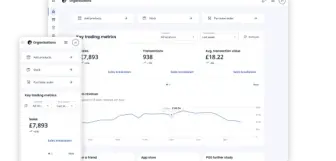
Reporting and analytics. See your best-selling products, busiest hours, and staff performance at a glance. Real-time dashboards help you spot trends early and make decisions based on data, not guesswork, whether that’s adjusting prices or planning next week’s rota.
How should I use my business management app?
A business management app is more than a digital filing cabinet. Used well, it can help you put your business strategy into action. Here’s how.
Bring your business goals to life
Whether you want to grow revenue, open a second site, or free up more of your own time, a business management app gives you the tools to make it happen and move towards your vision. Sales and customer features help drive growth, and automation takes everyday admin off your plate. Because everything sits in one system, every part of your business can pull in the same direction.
Go multichannel with your sales
A business management app makes it simple to sell wherever your customers are: in-store, online, through delivery apps, or over social media. All your channels share the same stock and sales data, so you can open new revenue streams without adding much to your workload. Customers get a consistent experience wherever they shop, and you can add new channels as you grow.
Cut running costs by trading efficiently
Small inefficiencies add up, especially when margins are tight, and a business management app helps you spot and fix them. Stock data shows you exactly what to order, which reduces waste and ties up less cash in stock. Sales trends help you match staff rotas to your busiest periods. Automating tasks like invoicing and reordering frees up hours each week, all without cutting corners on service, giving your business an edge over the competitors that don’t use technology to its full potential.
Make decisions based on data
Every sale you make feeds valuable information into your app. Built-in reports show you which products are flying off the shelves, which are gathering dust, and when your busiest hours are. With these insights at your fingertips, you can adjust pricing, plan promotions, and refine your menu or product range based on facts, not just a gut feeling. Even small tweaks can make a big difference over a year.
What are the best business management apps?
For most retail and hospitality businesses, the best business management app is a POS system, because it sits at the centre of everything else, linking together a variety of business management apps from payment processing, product and inventory management, to accounting software. Here are some examples:
Epos Now
Epos Now is an all-in-one POS system built to help businesses trade smarter. With 80+ key features, it covers everything from payments and advanced inventory management to staff permissions and payroll, to real-time reporting. It runs on Android, iOS, and Windows, so it doesn’t matter which operating system you prefer; it keeps working offline if your connection drops briefly, and comes with a full range of hardware, from countertop terminals to portable card machines.
Where Epos Now really stands out is its AppStore. The company has partnered with many of the leading business software providers while developing its own apps, too. It now has 100+ integrations, including Xero, Sage, QuickBooks, Shopify, Workforce.com, Deliveroo and OpenTable. That means you can connect your accounting, online store, marketing, delivery and bookings to your POS, and send sales data straight to your books automatically. They’ve also got specialised apps for different industries. Add phone and live chat support, plus a user-friendly system that can have you training staff in as little as 15 minutes, and you’ve got a system that makes life much easier for your business.
While Epos Now boasts a particularly impressive app store and has an easy-to-use interface, other providers may have similar features but have built their systems differently, meaning the choice you make has a big impact on what you're able to do with your business management app.
Square
Square is a popular choice for small businesses. What Square does differently from providers like Epos Now is offering reduced-feature systems with lower entry expenses. If you’re a new business and you don’t want to set inventory management up just yet, Square might offer you an affordable system to process payments, with some business reports and staff management features, but you won’t be able to centralise as much of your workflows through your point of sale, and they may charge slightly higher card rates to compensate for the low upfront costs.
Square also has some premium subscriptions that have all the features you need. As a market leader, they have lots of handy features once you have this upgrade, and, like Epos Now, they offer next-day payouts on their payment processing.
Pros:
-
Simple flat card rates
-
Offline mode
-
Next-business-day payouts
Cons:
-
Some reports and floorplan tools need an upgrade
-
No third-party payment processing
-
No equivalent app store
-
No 24/7 UK phone support
Lightspeed
Lightspeed is a well-established POS provider with systems for both retail and hospitality, and it offers solid hardware bundles. It’s a capable system with solid inventory management, so it can suit businesses with larger product ranges. However, Lightspeed is built around a modular pricing model. Its monthly software fees are higher, and features like customisable reports and certain modules cost extra on top. Permissions management is limited on basic plans, priority support is reserved for higher tiers, and in-person card rates are quoted individually rather than published as a flat rate. That makes it harder to know exactly what you’ll pay as you grow.
Pros:
-
Inventory management
-
Hardware bundles available
Cons:
-
Higher monthly software costs
-
Custom reports and some modules cost extra
-
Priority support on higher tiers only
SumUp
SumUp started out in card payments, and many small businesses will recognise its compact card readers. Its POS offering follows the same simple approach. It has a flat card rate, a software-only option if you’d rather use your own iOS or Android devices, and a choice of two fixed hardware devices, the Lite and the POS Pro. That makes it a straightforward option for small businesses that mainly need to take payments. However, it has a much smaller feature set than an all-in-one system, making it a more limiting business management app than competitors like Epos Now. Features like staff role allocation and automated low-stock alerts are missing, and integrations for loyalty and accounting are limited. SumUp also has fewer options for multi-site, multichannel, and hospitality businesses, so you may outgrow it as your business develops.
Pros:
-
Flat-rate card processing
-
Software-only option for your own devices
-
Advanced inventory
Cons:
-
Smaller feature set
-
Limited integrations and hardware
-
No 24/7 UK phone support
PayPal POS
PayPal POS is a mobile app-based POS that runs on iOS and Android devices. It’s quick to set up and uses a flat card rate, and it covers the basics, including staff roles and online payments. It’s a good fit for market traders, pop-ups and other small or on-the-go businesses, which seem to be its target market. But because it’s a mobile app rather than a full EPOS system, its feature set is fairly light. Inventory tools are basic, there’s no multi-location stock transfer for larger businesses, and there’s no offline mode, so you’ll need a reliable connection to keep trading. For key functions like payroll, PayPal relies on third-party integrations, which means more separate systems to manage.
Pros:
-
Simple mobile setup
-
Flat-rate card processing
-
Staff roles and online payments
Cons:
-
No offline mode
-
Basic inventory only
-
Relies on third-party apps for key features like payroll
So, what should your business management app do?
A good business management app should do more than process sales. It should bring your payments, stock, staff, finances, and customer data together in one place, saving you time and cutting down on errors. Used well, it can help you put your strategy into action, whether that means selling across more channels, trading more efficiently, or making smarter decisions with real-time data.
For most retail and hospitality businesses, a POS system makes the best foundation. A platform like Epos Now, with its 100+ App Store integrations, lets you build a complete system that grows with your business and leaves you ready to adapt to the challenges you face.
Take a look at Epos Now’s retail and hospitality point of sale options!
Enjoy this blog? Take a look at some other related business guides:
Frequently asked questions
- What are the five basic business applications?
-
The five basic business applications are usually listed as word processing, spreadsheets, presentation software, databases, and communication tools like email. These are useful for lots of reasons, but for running day-to-day operations, most businesses actually rely on business management apps for sales and payments, inventory, staff management, accounting and customer management.
- What is the best app to organise my business?
-
The best app depends on your business, but for most retail and hospitality businesses, a POS system is the best place to start. A platform like Epos Now brings payments, stock, staff, and reporting together, and its App Store offers 100+ integrations, so you can organise everything from one place and access all the tools you need.
- What apps do CEOs use?
-
CEOs typically rely on apps that give them a clear view of performance and keep teams connected. These include reporting dashboards, accounting software like Xero or QuickBooks, communication tools like Slack or Microsoft Teams, and project management apps. In retail and hospitality, a point of sale often lets CEOs maintain oversight of trade and look after the needs of their business.
- What are the top 5 business apps?
-
It depends on what you need, but popular choices include:
-
A POS system like Epos Now for sales and stock
-
Accounting software like Xero or QuickBooks
-
Microsoft 365 or Google Workspace for documents and email
-
Slack or Teams for communication
-
Mailchimp for marketing
-
- What are the 5 core business processes?
-
The five core business processes are usually defined as sales, marketing, operations, finance, and human resources. A good business management app supports all of them, from taking payments and running loyalty schemes to tracking stock, syncing with accounting software, and building staff rotas.