Epos Now 3.32 Release Notes
Released 2 December 2025
Included in this release:
NEW
- Epos Now Capital powered by Pipe
- Printing to PDF options now available in the Transaction Report
- Sales summary notifications available in the Back Office
MINOR FIXES
- An overview of our minor fixes
COMING SOON
- Product and category images on till
NEW: Epos Now Capital powered by Pipe
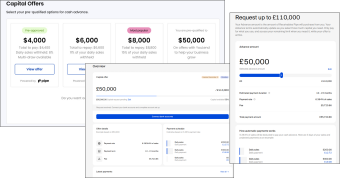
We’re excited to announce the launch of Epos Now Capital powered by Pipe in the US, Canada, and the UK!* Pipe is a new, more flexible way for merchants across our global Epos Now community to access working capital when they need it most.
This expansion significantly increases access to funding for our entire customer base. With Pipe’s innovative approach, we’re able to serve more merchants in more regions, including customers who may not have previously qualified for traditional capital offers.
Whether you’re looking to invest in stock, staff, marketing, refurbishment, or growth, Epos Now Capital powered by Pipe opens the door to fast, simple, and reliable financing that fits how your business runs.
- Multi-drawdown flexibility: Apply once, and unlock a pre-approved funding limit you can draw from multiple times. Take only what you need, when you need it.
- Instant pre-approved offers: No lengthy applications. Funding offers are fully pre-approved based on your business’s performance.
- Funds in as little as 24 hours: Receive capital as soon as the next business day after requesting a drawdown.
- Available to POS-only customers: Even if you only use Epos Now POS, you may now be eligible for funding -opening access to thousands more merchants across our global base.
- Revenue-based payments: Repayments are simple and aligned with your business activity. Pipe automatically collects payments through Direct Debit/ACH. Payback is based on a fixed percentage of your daily transactions, helping you stay in control of cash flow.
Get your Pipe offer!
Eligible merchants will begin seeing their pre-approved offers directly in their Epos Now Back Office.
*Available in the US - November 24, Canada - December 2, and the UK - December 4.
NEW: Printing to PDF options now available in the Transaction Report
We have introduced new PDF printing functionality to give you more control over how you save and share your transaction data.
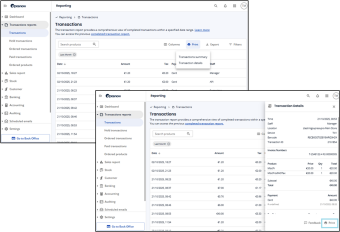
A new print button has been added to the top of the Transaction Report. From here, you can choose between two options:
- Transaction summary: This generates a PDF of the full summary version of the report for the selected date range and filters. All report columns are included in the PDF, not only the columns currently visible on screen.
- Transaction details: This generates PDFs for one or multiple selected transactions, including product lines, subtotals, discounts and totals.
You can also open an individual transaction and use the print option at the bottom of the details panel to create a PDF of that single record.
These additions give you a straightforward way to produce clear PDF copies of your reports for record keeping, auditing or internal use, without needing to export the data first.
NEW: Sales summary notifications available in the Back Office
Daily sales notifications are now available! You can activate them in your Back Office to start receiving a simple daily summary of your sales performance.
Configuration
-
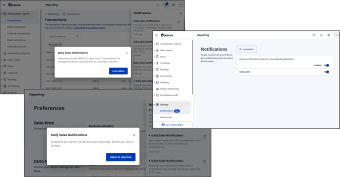
Activate notifications in Settings > Notifications in the Back Office. They are off by default, so you’ll need to enable them to receive your first summary.
-
From the same screen, you can adjust how you receive notifications and turn them on or off at any time.
-
In Settings > Preferences, you can set your business hours so calculations match how your company operates.
For example: if your business day starts at 5:00 am, your daily sales total will be calculated from 5:00 am to 4:59 am the following day.
Coming soon: Optional Weekly Notifications (Sales Summary and Business Health Check) to help you track longer-term trends. It’s a great opportunity to begin with the daily updates and get familiar with your sales insights.
MINOR FIXES
- Reporting - Stock discrepancies report improvements: We have improved the performance of the Stock Discrepancies report. These updates will help the report run faster and provide your results more quickly.
-
Table plan resync timer: Fixed the resync timer not restarting when returning to the page and now always reflects resync time correctly.
-
Petty cash and payout pages: Fixed issue causing users to not be able to scroll correctly on petty cash and payout pages
COMING SOON: Product and category images on till
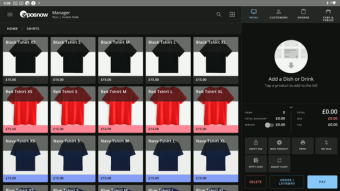
Product and Category images will be available to all users shortly after we wrap up the pilot. This will allow you to add your own images or stock images to your till.
-
Bulk image uploading
-
Image column on both the New Product List and New Category List
-
Free Pexels integration allows you to search stock photos from the web
Sign up below to be one of the first to try product and or category images on till!