Epos Now 3.50 Release Notes
Released 6th October 2026
MAJOR UPDATES
-
Bookings - Branding pages
-
Camera enhancements on Pro+ & Pro+ 2
-
Easier device setup
-
New report landing page
-
KYC banner update
MINOR UPDATES
-
Bookings improvements
-
Easier device setup
BUG FIXES
-
Delivered 7 bug fixes in 3.50, spanning EBT tipping/promotions, customer display, Back Office, KDS and staff hours management.
-
Highlight: resolved an issue where gratuity could incorrectly be added to EBT splits on Duo/Gen2 devices with a second screen.
COMING SOON
-
The new My Business App
-
Epos Now Intelligence
-
Extend the way you sell with Epos Now Kiosk
Make your booking page your own
- Availability: UK / US / Australia / Ireland
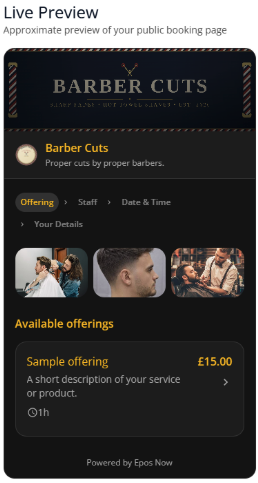
- What is it? You can now customise your Epos Now booking page to better reflect your business and brand. The new Branding section in Bookings lets you add your logo, cover and gallery images, choose your colours and light or dark mode, and add a tagline. You can also preview your changes in real time before making them live.
- Why does it matter? Give customers a more personalised booking experience that feels like your business from the moment they arrive. Showcase your brand and services with your own imagery and make your booking page more engaging for potential customers.
- How do I access it? Go to Bookings > Settings > Branding to customise your booking page and preview your changes before publishing.
Smoother, simpler bookings
- Availability: UK / US / Australia / Ireland
- What is it? We've made a range of improvements to Bookings to make creating and managing appointments simpler and more reliable. These include:
- Clearer deposit information — deposits, including 100% upfront payments, now display correctly in the customer's booking summary.
- Safer deposit settings — deposits are now capped at 100% of the service price, preventing customers from being charged more than the service costs.
- Tax-exclusive pricing in the US — US businesses now show service prices before tax, with tax displayed separately at checkout.
- Faster product search — staff can now search for products by name when creating a booking, making it easier to find services in larger catalogues.
- Clearer editing and error messages — you'll now see confirmation when changes are saved, warnings before leaving unsaved changes, and plain-English messages when something needs correcting.
- More reliable customer details — improved telephone number validation helps ensure accurate contact information is collected when creating bookings.
- Easier waitlist management — improved date entry prevents the waitlist date picker from unexpectedly resetting.
- Reliable staff reassignment — changing the staff member on an existing booking now updates reliably and notifies the newly assigned team member.
- No-show notifications — customers are now notified by their configured SMS or email method when a booking is marked as a no-show, all for free as part of the Bookings app.
- Why does it matter? These improvements make Bookings easier to use for your team and clearer for your customers — from finding services and managing deposits to keeping staff and customers informed about changes to their bookings.
- How do I access it? These improvements are included automatically in Bookings. No action is required. Follow our Bookings setup guide for step-by-step instructions on setting up and configuring your Bookings experience.
Scan more products, faster with your camera
- Availability: Global.
- What is it? We've improved the camera barcode scanner on Pro+ and Pro+ 2, making it faster and easier to scan multiple products. A new dedicated action button in the basket gives you quick access to the scanner, while Pro+ 2 users can also open it using the device's dedicated camera button. The feature can be switched on or off in your settings.
- Why does it matter? Save time when adding multiple products to a basket. You can keep scanning without repeatedly re-entering the scanning mode, making stock and checkout tasks quicker and more efficient.
- How do I access it? The improved camera scanner is available on Pro+ and Pro+ 2. You can enable or disable it in your device settings. Camera scanning will also be coming to mobile devices, using the volume-down button to open the camera.
Easier device setup
- Availability: Global.
- What is it? We've made a number of improvements to make setting up and configuring your devices easier. These include:
- Updated setup wizards, clearer guidance and improvements to the on-screen experience.
- Improved onboarding wizards — new steps help guide you through setting up your device.
- Countertop 2 setup guides — new wizards walk you through installing and configuring the swipe card reader and customer-facing display.
- Order printer setup — the setup wizard now directs you to helpful video guides for installing and configuring your order printer.
- Customer display guidance — if you add a customer display to an already-set-up Countertop 2, a new pop-up directs you to the relevant settings to configure it.
- Updated icons and support layout — corrected wizard icons and improved the support modal for a clearer experience.
- Why does it matter? Get your devices set up correctly with less guesswork. Clearer guidance and step-by-step instructions make it easier to install new hardware and configure additional devices when you need them.
- How do I access it? These improvements are included automatically in the relevant setup wizards. No action is required.
Get instant business insights with the new Reporting Landing Page
- Availability: Currently available to merchants enrolled in the Dashboards Beta. You can join the beta from the enrollment banner on the new Transactions Report. Once the migration is complete, the Reporting Landing Page will become the default reporting home in the left-hand navigation.
- What is it? The new Reporting Landing Page is a redesigned hub for reporting in your Epos Now Back Office. It brings your key business metrics together in one place and provides quick access to the reporting tools you use most.
- Why does it matter? Get to the information you need faster, without waiting for traditional dashboards to load. You can:
- See your metrics instantly — review key business data without the lengthy loading times of classic dashboards.
- Track multiple metrics at once — view up to three metrics across custom timeframes and specific locations.
- Get to your reports faster — access your main dashboard, Transactions Report and Data Downloader directly from the new hub.
- Together, these improvements make it easier to understand your business performance and move quickly between the reporting tools you need.
- How do I access it? If you're enrolled in the Dashboards Beta, you can access the new Reporting Landing Page directly through the Reporting Hub. To join the beta, go to the new Transactions Report in Back Office and select Get early access on the beta banner.
Update to existing KYC banner
- Availability: Global
- What is it? An improved account verification banner that reminds you to complete required account details to avoid your payouts being blocked. It now appears consistently across Back Office home, Money home, Payouts, and Payment Setup, with the same status, deadline, and consequence messaging shown everywhere.
- Why does it matter? Updating your KYC is important to keep your account in good standing. Ignoring this may mean that your payouts can become suspended which can create cashflow issues.
- How do I access it? No action needed - the banner appears automatically on the affected pages for any merchant with an outstanding account verification requirement. Merchants can complete their details via Update Details in Money.
Bug Fixes
-
Fixed an issue preventing the customer display screen from showing promotional information.
-
Fixed a layout issue with the support button infobox.
-
Fixed an issue where gratuity could be added to an EBT split when tipping was enabled on a Duo or Gen2 device with a second screen.
-
Fixed incorrect item values on Back Office links displayed on the till.
-
Fixed an issue where voided orders weren't being removed from the Kitchen Display System.
-
Promotions split by EBT splits are now correctly recorded as promotions rather than discounts.
-
Fixed an issue preventing staff hours from being edited.
-
Fixed missing sound when a Search returns a "not found" item.
Coming Soon
Get an early look at what's coming next. Here's a preview of the features we're currently building and how they'll help you run your business more efficiently.
The new My Business app
- Availability: UK first
- What is it? The new home of Epos Now, a completely redesigned app bringing business setup, sales, payments, banking and more into one seamless experience.
- Why does it matter? Everything you need to start, run and grow your business, right in your pocket. One app. One login. Your whole business, wherever you are.
- How do I access it? POS and ENP merchants can download or update the My Business app at launch in October, and sign in with your Epos Now account.
Epos Now Intelligence
- Availability: Early access
- What is it? We’re giving Epos Now an intelligence upgrade! We want you to run your business in a smarter way, make more of your time and hit your goals. We’re building the concept now and we’d love to hear your feedback.
- Why does it matter? Make the most of Epos Now and save time - without adding more complexity to your day. Our intelligent platform can give you guidance, insights and answers more quickly helping to make your business more successful.
- How can I get involved? We're looking for merchants who would like to help us shape what's next. If you're interested in getting an early look at what we're building and sharing your feedback, get in touch with us to register your interest.
Register your Interest
Extend the way you sell with Epos Now Kiosk
- Availability: UK pilot
- What is it? A clean, fast self-service checkout for your customers. Customers can browse, add, and manage their basket and pay without support. Available for hospitality with ticketing out of the box or retailers who want a straight checkout. You can control the entire experience via the Back Office. Use our Countertop 2 to get the best experience for our customers.
- Why does it matter? Self-service kiosks give you a new way to service customers and reduce wait times. Let the orders come to you and have your team focus on delivery.
- How do I access it? This feature will roll out soon for compatible devices.
Join the Beta