Q1 2026 Release Note Roundup
The Hero Launch
- Epos Now Online
The Highlights
- Cash Out
- Faster Payouts
- Set up and manage direct debits in My Business
- Significant basket speed improvements
- New Back Office homepage
- Product & category images on till
Features that Keep the Business Running
- An overview of launched features
THE HERO LAUNCH
Epos Now Online
Sell online in a few easy clicks
Take your business online in minutes - no double handling, no disconnected systems. Products, pricing, and stock sync automatically from your Back Office, while orders flow straight into your POS. With payments built in, you can manage everything in one place and grow your revenue beyond the counter.
With Epos Now Online, you’ll also be able to leverage built-in AI tools that help recommend page layouts, optimise your site for search, generate site text, and automatically add image alt text so you can launch a professional online presence with ease and at speed.

THE HIGHLIGHTS
Cash Out
Get paid out whenever you want
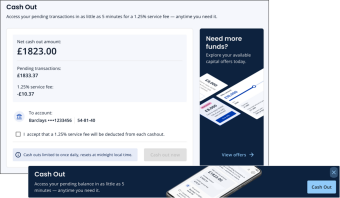
Access your earnings whenever you need them with Cash Out. With this latest feature from Epos Now Payments, eligible merchants can transfer funds from their balance in minutes giving you the flexibility to restock, pay staff, or handle unexpected costs without waiting for standard payouts.
You’ll see Cash Out advertised in your Back Office whenever funds are available, alternatively click on the button below.
Faster Payouts
Now available in multiple countries
If you're an Epos Now Payments merchants you can benefit from getting access to your funds the same day instead of waiting until the next day.
For an additional 1% on your standard card rate, your payouts are processed automatically each day, helping improve cash flow and giving you quicker access to your earnings when it matters most.
This feature is now available in the UK, US, Canada, Australia, New Zealand, Ireland and Spain.

Setup and manage direct debits in My Business
Automate your payments
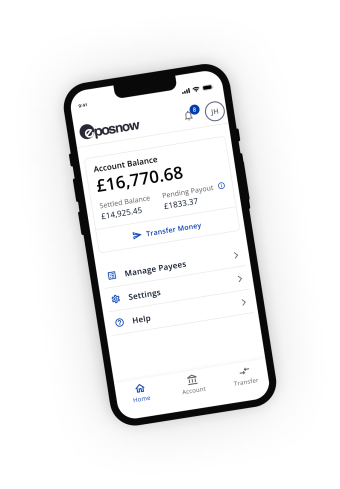
Set up and manage direct debits directly within the My Business app, giving payout account holders a simple way to handle recurring payments without relying on external tools. By bringing everything into one place, it streamlines payment management, saves time, and gives you greater visibility and control over your outgoing payments.
Setup or view active direct debits in the My Business App under Account > Manage > Scheduled Payments.
Significant basket speed improvements
Serve more customers, faster
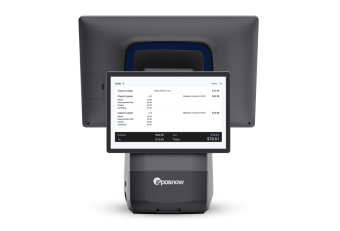
This quarter we made exceptional improvements to the speed of every transaction with up to 80% faster basket performance.
Add items quicker, move through checkouts smoothly, and reduce queues during peak times. This improvement helps your team stay efficient and your customers happy.
New Back Office homepage
Updated sales & performance dashboard
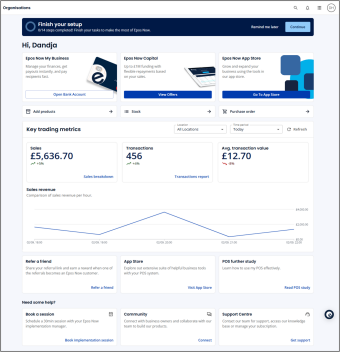
Get instant visibility into how your business is performing. Faster load times and clear period comparisons make it easier to spot trends, track growth, and make better decisions without digging through reports.
The new homepage now features key stats that help you have instant insights:
-
Key trading metrics with built-in filters
-
Quick-add access to business essentials
-
personalised offers designed to help your business grow
-
Easy access to key pages, such as the App Store
-
Fast access to support
Product & category images on till
Make your till easier to use at a glance
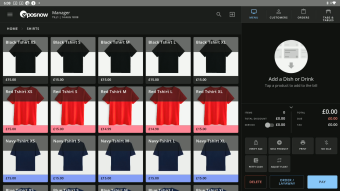
Product and Category images allow you to add your own images or stock images to your till. This new addition allows users to:
-
Carry out bulk image uploads
-
View uploaded images in a column on both the New Product List and New Category List pages
-
Use a free Pexels integration to search stock photos of products and images from the web
FEATURES THAT KEEP THE BUSINESS RUNNING
Product list and stock management improvements
What it is: Product lists provide an overview of the entire product range, while stock management automatically tracks inventory, ensuring you always have exactly what your customers need, when they need it.
What we’ve solved:
- Bulk stock adjust: The ability to update multiple product counts on one screen with a final "Confirm" step.
- Track stock: The ability to track and edit stock directly from your product list for one off products that need updating.
- Cost price tracking: Improved visibility of cost prices in the stock list to monitor profit margins during replenishment.
- Enhanced search: Search bars now support partial matches and SKU/Barcode scanning with higher accuracy.
- Supplier Locking: To prevent data corruption, the system now prevents the deletion of a supplier if they are linked to active stock or open purchase orders.
Why it matters: Streamlines daily inventory tasks and safeguards your data, allowing you to manage stock more accurately in less time while protecting your bottom line.
Global search navigation
What it is: The global search navigation bar is part of the Back Office. This feature allows users to quickly find things in the Back Office.
What we’ve solved: Users can now access Payments and Payouts directly from the global search bar, removing the need to manually navigate through multiple menus to find key financial tools.
Why it matters: Skip menus and get where you need to go faster, saving time on everyday tasks.
Customer display customisation
What it is: This feature that allows merchants to tailor their customer display (only available on the Duo Countertop).
What we’ve solved: Ability to add your logo, choose themes, and customise screen settings on the customer display.
Why it matters: Deliver a more branded, professional checkout experience that reflects your business.
PSP references in reports
What it is: PSP (Payment Service Provider) references are unique alphanumeric identifiers assigned by processors (like Adyen or Stripe) to specific payment transactions or modifications, such as refunds.
What we’ve solved: Payment Service Provider (PSP) references are now always included in the transactions part of reports.
Why it matters: Missing or inconsistent payment references that made reconciliation harder. This update makes reconciliation quicker and more accurate, reducing time spent matching payments.
PDF export options
What it is: Export function that allows reports to be downloaded as PDFs for easy sharing.
What we’ve solved: Difficulty sharing or storing reports in a standard, portable format.
Why it matters: Simplifies record-keeping and makes it easier to share insights with accountants or teams.
Weighted products display
What it is: “NET” is now only shown when a tare is applied for weighted products.
What we’ve solved: Unnecessary or confusing information displayed during standard weighted transactions.
Why it matters: Creates a cleaner, less cluttered display for faster and more intuitive use at the till.
End of Day (EOD) updates
What it is: End of Day (EOD) tasks are essential closing procedures performed to summarize daily business operations, reconcile finances, and prepare for the next business day
What we’ve solved: Highlights unsynced transactions when trading offline, which removes the lack of visibility into missing or unsynced transactions during offline trading.
Why it matters: Helps you quickly identify and resolve gaps, keeping your reporting accurate and up to date.
MFA and authenticator apps
What it is: a security process requiring users to provide two or more verification factors to gain access to an account or application.
What we’ve solved: Limited authentication options for securing account access. Multi-factor authentication now supports authenticator apps for Back Office login verification.
Why it matters: Adds an extra layer of security to protect your account and sensitive business data.
Pro+ Quick Pay controls
What it is: Quick Pay allows merchants to create a payment for a product or service on the Pro+ card terminal.
What we’ve solved: Quick Pay settings can now be managed through staff permissions, solving the lack of control over how and when Quick Pay could be used across teams.
Why it matters: Gives you greater control over how payments are taken across your team, reducing errors and misuse.
Audit logs
What it is: View a detailed log of system changes, including what was updated, who made the change, and when. Currently, this feature is limited to the Organisations page - rollout of this feature across other pages is ongoing.
What we’ve solved: Limited visibility into system changes and user actions.
Why it matters: Improves transparency and accountability, making it easier to track activity and resolve issues quickly.