Tip Screen Etiquette: How to Set Up Gratuity Options on Your POS



There are a few ways of utilising your customer-facing screen for your customers, which we’ll run through today. But one valuable way of doing so is by displaying your tip options. This removes the need for staff to ask for tips directly, and actually increases the likelihood of a customer tipping. This means adding a tip screen is a fantastic way of keeping your staff happy and well compensated for their work.
So, today, we’re talking all things tip screen. We’ll cover:
-
What is a tip screen?
-
What are the uses of a customer-facing screen?
-
What are the advantages of tipping screens?
-
How do you set up your tip screen on an Epos Now POS system?
By the time you’re done here, you’ll know everything you need to get the full benefit of a tip screen, creating a better experience in your business for staff and customers alike. So let’s get into it!
What is a tip screen?
A tip screen or customer-facing display is a screen that connects to your point of sale (POS) system and allows customers to watch or even interact directly with the POS (in specific ways) during the checkout process, for example, by selecting a tip amount to add to their checkout total.
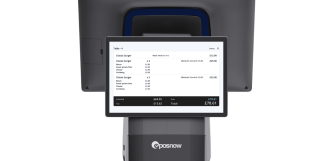
Customer-facing screens come in a range of forms. The older, more basic devices are typically non-touchscreen displays that stand beside or in front the POS terminal, connected via USB cable. These early displays simply got updates from the point of sale when an item was selected, showing the total sales amount as items were added to the basket. Some devices might show itemised sales, showing what item had been added, how much it cost, and then displaying the new total. But even these more limited devices give customers more visibility into their transaction.
The latest customer-facing screens are a few steps up from these origins. Today's devices are typically compact touchscreen displays, often integrated/attachable to the POS hardware itself, sometimes mounted separately, that guide customers through an interactive checkout flow and share information about the business and help build the brand. This includes a range of features. For example, a customer might be able to confirm and amend order totals and their basket, selecting a payment method, deciding how they wish to receive their receipt, and, crucially, choosing whether to leave a tip and how much.
It's this last feature that makes the modern tip screen such a valuable tool for customer-facing businesses.
What are the uses of a customer-facing screen?
Customer-facing screens can work as basic calculators that a customer watch, or as complex devices that show off how professional and modern your business is, encouraging customer engagement, and even influencing whether the customer comes back to your business or not. That makes it important to know what your kit can do, so here are some of the key uses:
-
Displaying branding and business information. Customer-facing screens can display your company logo, brand colours, and a promotional messages when idle. This reinforces your brand identity at the point of sale, helps spread key information about the business, and gives the checkout a more professional, polished feel.
-
Displaying sales totals. The most basic function of any customer-facing screen is showing the running total as items are added. This gives customers immediate visibility into what they're being charged, reducing any confusion at the point of payment, reducing the likelihood of hold-ups at the till.
-
Itemized sales display. Customer screens can also show each item as it's scanned or added, including the item name and individual price. This keeps customers informed and helps catch any errors either the customer made in ordering/shopping or the member of staff made when adding to the basket.
-
Basket confirmation and amendments. Touchscreen devices may allow customers to review their full basket before paying, giving them the opportunity to flag any discrepancies or remove items they no longer want, adding complete transparency to what’s happening on the point of sale terminal before they pay.
-
Payment method selection. Rather than the cashier directing the process, customers can choose their preferred payment method directly on the screen, whether that's card, cash, or a digital wallet, allowing the staff member to help with bags and help the customer in other ways.
-
Receipt preferences. Customers can select how they'd like to receive their receipt, printed, emailed, or not at all, streamlining the end of the transaction and potentially capturing marketing data for the business.
-
Tip selection. Last but certainly not least, customers can choose to add a gratuity directly from the screen, selecting from preset percentages or entering a custom amount, without any prompting from staff.
Not all customer-facing screens offer all of these features, so it's worth checking exactly what a device supports before purchasing.
What are the advantages of tipping screens?
Beyond their practical uses, customer-facing screens bring a range of broader benefits to your business:
-
Greater transparency and trust. When customers can see their transaction playing out in real time, and are given full autonomy over things like receipts and tipping, it builds confidence in your business. Visible, itemised totals reduce the chance of disputes and reassure customers they're being charged correctly, fostering a sense of honesty and professionalism.
-
Stronger brand visibility. Displaying your logo, brand colours, and messaging at the point of sale keeps your brand front and center during every transaction. It's a small detail that contributes to a more cohesive, memorable customer experience.
-
Marketing and promotional opportunities. Idle screens can be used to highlight deals, promotions, loyalty programmes, or new products. This turns the checkout into a subtle but effective marketing touchpoint, reaching customers at the moment they're most engaged with your business.
-
Data capture and customer insights. Some customer-facing screens support email receipt options, loyalty sign-ups, and marketing consent options, which give you a natural, low-friction way to capture customer data and expand your marketing base. This directly includes your tip screen in your customer retention strategy and helps you market your business.
-
Faster, smoother checkout. By giving customers direct control over elements of the checkout, like selecting their payment method, receipt preference, tipping, the process becomes more efficient. Staff can talk to customers about their experience, or even make conversation, without slowing the sale, improving the atmosphere at checkout while keeping queues short.
-
Higher tips for your staff. A tip screen removes the awkwardness of staff asking for gratuity directly. Customers are prompted naturally and privately, which can actually result in as much as a 26% increase in tip volume, meaning better take-home pay for your team.
-
Reduced disputes and errors. When customers actively confirm their basket and total before paying, that’s a clear message saying yes, this is right, and I’m happy to proceed. This protects your staff from accusations of overcharging and reduces the time spent resolving post-sale complaints.
How do you set up your tip screen on an Epos Now POS system?
Epos Now's customer-facing display is a great example of a leave a tip screen that gives you more control over the checkout experience. From tip screen adjustments and receipt preferences, to dark and light modes, custom branding, and clock format, this is a display you can tailor to suit your business, and you manage it through your till settings or Back Office software.
Note: The below advice is for using a Countertop, Duo Countertop or Countertop 2 device.
Setting up your hardware and software
To get started with your Epos Now customer display, you'll need a compatible POS terminal. The tip screen is easy to connect to your sales terminal, with a few simple screws, and a connection port, making the hardware setup a quick, two-minute job.
On the software side, before you can enable the tip option screen, make sure tipping is activated in your Payments settings, which is a prerequisite for the tip screen to function. You'll also need to ensure "Print a receipt after each transaction" is turned on in your Front Till Settings if you plan to offer receipt options to customers. That way, every time you make a sale, the tip screen will offer physical, SMS and no receipt options.
Once these are in place, you're ready to configure your display!
Adjusting your settings
All customer display settings are found by navigating to Front Till Settings and opening the Customer Display section. Here's what you can configure:
-
General display: Toggle the customer display on or off, for starters. But you can also switch between light and dark mode, and choose between a 12-hour or 24-hour clock format.
-
Receipt screen: Enable a receipt prompt so customers can choose how they receive their receipt, whether by email, SMS, or print. If receiving by email, or if they want your marketing communications, you can also give customers the option to enter their contact details and create a customer account.
-
Custom image: Add your logo or branded imagery to the customer display (you can upload an image in your Back Office).
How to set up gratuity options
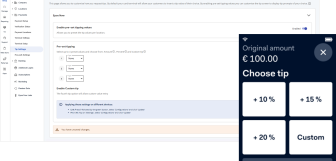
You can also setup your tip selection on an Epos Now custom display. When active, customers will be prompted to choose a tip directly on the screen rather than at the card payment terminal.
You can also configure which percentage options are displayed, and this is worth thinking carefully about. Typical presets sit around 10%, 15%, and 20%, giving customers a clear range from modest to generous. Setting your lowest option too high can create friction and cause people to leave fewer tips, so it's worth anchoring your range at a comfortable starting point for your customer base.
The custom amount option is always handy, and will appear alongside your presets, allowing customers who want to tip a specific figure to do so without being confined to presets. The no tip option also appears, which reassures customers that they are under no pressure to leave a tip, and will not need to feel awkward about not wanting to do so. But as stated earlier, this actually leads to more people opting to tip. Customers who feel pressured or unable to easily decline are more likely to leave the interaction with a negative impression, which ultimately does more harm than good.
Tip screens: a more polite way to keep your staff happy
A well-configured tip screen might feel like a small change to your business, but that’s not how it feels to customers. They can have a serious impact on their experience, on your staff's earnings, and the overall professionalism at your checkout. Combined with the wider benefits of a customer-facing display, from branding and transparency to smoother, faster transactions, to customer data collection, one of the most straightforward upgrades a customer-facing business can make.
If you're ready to make the switch, Epos Now can offer affordable POS systems with integrated tipping features, and powerful, fully customisable customer displays built in, giving you everything you need to create a checkout experience that works harder for your business, your team, and your customers!
Frequently asked questions
- Does gratuity go directly to the server?
-
This depends on the business's tipping policy. There are two main approaches businesses take to tips. Some operate a tip pool system where all gratuity is collected and distributed equally among staff … and sometimes that includes staff in roles that don’t earn tips directly as they don’t encounter staff, like chefs in a restaurant. Others allow tips to go directly from customer to server. There's no universal rule, so it's worth clarifying your policy with your employer or, if you're a business owner, setting a clear policy your team understands.
- What is the best way to pay out tips?
-
The most common approaches are paying tips out in cash at the end of each shift, or adding them to staff wages through payroll. Payroll is generally considered the more transparent and legally straightforward option, as it creates a clear record. Whichever method you choose, make sure it complies with local employment law and that staff are informed of how and when they'll receive their tips.
- Is 10% tip disrespectful?
-
Not at all. 10% remains a perfectly acceptable tip. Tipping norms vary by country, establishment, and the quality of service received. While 15–20% has become more common in some settings, your means and your satisfaction with the service are important to consider when deciding how much to tip. The simple truth is, tips of any amount are gestures of appreciation, and no tip should ever be given out of guilt.
- How does a tip screen work?
-
A tip screen is a feature on a customer-facing display connected to your POS system. After a transaction is processed, but before payment is taken, the screen prompts the customer to select a tip amount, usually from a set of preset percentages, with options for a custom amount or no tip. The selected amount is then added to the transaction total before payment is taken, with no need for staff to ask directly, which can seem intimidating to a lot of customers.
- Do you want to leave a tip screen?
-
A tip screen is a prompt displayed on a customer-facing POS display at the end of a transaction, asking customers if they'd like to add a gratuity. Whether your business should use one depends on your sector and customer base, but the evidence is clear: businesses that introduce tip screens typically see an increase in both the frequency and value of tips left by customers, making them worth thinking about.