Restaurant Bookkeeping UK: The Complete Guide for 2026



For restaurant owners who love the business and the industry, there's no better challenge than overcoming the odds, and having a successful and profitable business where customers can enjoy your food, drinks and atmosphere.
One of the most important elements of your restaurant's financial health is managing your restaurant bookkeeping effectively. For restaurant owners, you must keep accurate and up-to-date books so you know your financials inside and out.
Fortunately, you can take some relatively simple steps to ensure your bookkeeping is in tip top shape. Let's go over a few basics so you can start mastering the art of restaurant bookkeeping.
What is restaurant accounting?
First and foremost, let's understand the basics of restaurant accounting (also referred to as bookkeeping for the restaurant industry). Restaurant accounting is a financial process that involves recording and organising financial transactions related to running a restaurant.
It's important to keep accurate records of every transaction in your restaurant so you can track spending, identify areas for improvement and manage taxes properly.
What financial transactions should you track in restaurant accounting?
It's important to track transactions such as:
- incoming payments from customers
- outgoing payments for suppliers and vendors
- payroll expenses
- Operating expenses
- taxes and insurance
- rent or mortgage payments
You should also keep detailed financial records of all your restaurant bank accounts, including your business checking, savings and credit card accounts.
This will help you keep track of ALL recorded financial transactions so you know what's going on with your financials at all times.
Here are just some of the benefits of keeping track of your financials:
- Track restaurant expenses and income to identify areas of your business that need improvement
- Better understand how much revenue you're bringing in, and where it's coming from
- Monitor and forecast cash flow so you can plan ahead
- Understand the financial health of your restaurant at all times
- Easily prepare taxes and financial statements
- Spot potential issues and problems before they become major problems
- Get access to credit if needed
- Easily monitor payroll and employee hours
Now that you know why restaurant bookkeeping is so important, let's talk about the basics of how to get started
5 steps to mastering restaurant bookkeeping for your restaurant
Step 1: Track your daily sales on a POS system
It's important to keep track of your daily sales to monitor cash flow and understand where money is coming and going. A Point-of-Sale (POS) system can help you easily manage this process.
A good restaurant POS system will generate detailed daily sales, inventory, and staffing reports. All this data can be used to identify areas of the business that need improvement.
You can also find specialised hospitality POS systems with features designed to streamline restaurant operations.
From employee management to table service, app integrations, payment processing services and customer loyalty programs, these systems can help you easily stay on top of your restaurant business.
Step 2: Streamline your Accounts Payable
It's important to stay on top of your Accounts Payable, so you know exactly what money is owed to suppliers and vendors.
For those who aren't yet aware, Accounts Payable is the money you owe to suppliers and vendors for goods or services needed to run your restaurant. For example, if you own a small food truck business, your Accounts Payable would include food, supplies and equipment expenses.
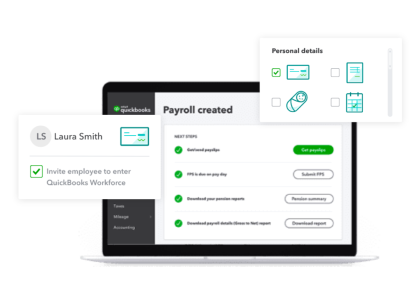
Quickbooks is one popular and comprehensive accounting software that can help you manage your Accounts Payable. It's an easy-to-use platform that allows you to track invoices, pay bills on time, set up payment reminders and export data into other programs.
Integrate With Quickbooks
With QuickBooks Online and Epos Now, you can quickly export your sales data and save on average 8 hours of work per month on your accounts.
Step 3: Simplify your payroll processing
Payroll processing is one of the most compliance-heavy parts of running a restaurant, with several UK-specific obligations to stay on top of.
You'll need payroll software that handles PAYE and Real Time Information (RTI) submissions automatically, reporting pay and deductions to HMRC on or before each payday. The more automation you implement here, the less room there is for human error. You'll also need to apply, at least, the correct National Living Wage rate (£12.71/hour as of April 2026), calculate holiday pay accurately for variable-hours staff, and manage auto-enrolment pension contributions and re-enrolment cycles.
It's a lot to stay on top of, but using the right tools makes it much easier. For example, if your restaurant runs a TRONC scheme, good software integrates your POS system to tip distribution and reporting, keeping it correctly taxed and NI-exempt where applicable. All you and your team need to do is take the tips through the POS!
Statutory Sick Pay and maternity/paternity pay are further elements of payroll that need to be calculated and paid correctly and on time, but most payroll platforms will flag eligibility and handle this automatically, reducing the risk of costly errors.
Step 4: Reconciliation is key
Reconciliation is the process of comparing different sets of financial data to make sure they match up. For example, you might need to reconcile your bank statements and credit card bills with the financial reports generated by your POS system.
Reconciliation ensures accuracy and prevents fraud and accounting errors, so this process must be conducted regularly. Today's restaurant accounting tools make reconciliation simple. You can quickly upload your bank and credit card statements, compare them with your reports, and generate accurate financial statements in minutes.
Step 5: Calculate your costs
Restaurant costs come in all shapes and sizes, from food costs to labour costs and everything in between and understanding your overhead costs is key to managing your budget.
Some of the most important costs to keep track of include:
- Cost of goods sold (COGS): This is the cost of products you sell, such as food and beverages
- Labour costs: This includes wages, taxes and other employee-related expenses
- Rent/lease: This includes rent or mortgage payments for your restaurant space
- Utilities: This includes electricity, water, gas and other utility bills
- Equipment: This includes kitchen equipment, furniture and other items you purchase for your restaurant
- Food costs: Your food costs include ingredients, packaging and other food-related expenses
- Marketing and administration: This includes advertising costs, business insurance and other non-product related expenses
Once you know your costs, set aside a budget for each expense so you can easily monitor how much money is being spent on what.
Restaurant food cost percentage
Getting the right mix in your spending is what people are really talking about when they say "balance your books". Your food cost percentage is a big part of that, telling you how much of your revenue is being eaten up (literally) by ingredients. It's one of the most important numbers in restaurant finance; get it wrong, and even a busy dining room can quietly bleed profit.
The industry benchmark is 28–35% of revenue (roughly the same as your payroll), though this varies by concept and cuisine. Sitting outside that range usually means you're leaking money. You can win this back by employing controls and how you use your ingredients: portion control removes overserving which can become a big expensive across hundreds of covers. Tracking and reducing waste through spoilage, over-prep, plate returns can help ensure more of your food is consumed rather than thrown away. Menu engineering promotes high-margin dishes and re-pricing or removing low-margin ones can make your ingredient expenses win you more revenue. FInally, renegotiating with suppliers, especially seasonally, can also shave meaningful percentage points.
The calculation itself, to determine your food cost percentage, is fairly simple: divide your Cost of Goods Sold (your supplier bills) by your revenue, then multiply it by 100. For example, if COGS is £9,000 and revenue is £30,000, your food cost percentage is 30%, right in the healthy range.
The harder part is getting accurate and timely COGS data, but for businesses with the right POS system, that's easily done. If you input the cost prices of your ingredients onto your POS, a good POS will help you generate reports on your inventory expenses, calculating food costs in real time as dishes sell, rather than waiting for a monthly stocktake. This ensures problems surface while they're still cheap to fix.
Labour cost percentage
Alongside food cost, labour cost is the most critical financial metric in your restaurant financial management, and should sit in a similar range as a proportion of revenue.
Labour cost percentage refers to how much you spend on staff relative to utilities, marketing, ingredients, and the other outgoing costs of running your business. This isn't just pay packets, but also covers National Insurance, pension contributions, annual leave costs, sick pay, etc., and shows how efficiently your team converts hours into sales.
- Industry benchmark. Typically 30–35% of revenue, though full-service restaurants often run higher than quick-service as there will be more staff per customer so closer attention can be paid to each diner.
- National Living Wage. From April 2026, the NLW rises to £12.71/hour for workers aged 21+, which inevitably increases baseline labour costs across the sector.
- Holiday pay for variable-hours staff. Restaurants use lots of casual and zero-hours workers to ensure they have cover when needed. But they accrue holiday pay based on hours actually worked, which can make miscalculating this is a common compliance issue. Pay extra attention to the hours these staff have worked to ensure your staff management system gives them all they're entitled to.
- TRONC schemes. A properly run TRONC (tip-distribution scheme) keeps tips outside National Insurance calculations, making tip management smooth for staff and employer alike, and keeps the business compliant.
- Managing labour without hurting service. Your POS system document how busy you are for each shift week by week, month by month, helping you match rotas precisely to forecasted demand rather than fixed shift patterns. Cross-train your staff to flex across roles and use sales data to identify quiet periods where hours can be trimmed painlessly, optimising your staff cost percentage.
Cash flow management for restaurants
Managing cash flow can be tough for any business, and restaurants face similar challenges. Your suppliers often want payment on delivery or within a maximum of 30 days, but you'll only make that money back once you've sold what they delivered, and card settlements can take a few days to clear. That gap catches out even profitable businesses.
Daily POS reconciliation should be your baseline for knowing where you'll stand ahead of time, matching your takings against bank deposits each day, not just at the end of the month.
Building a forecast doesn't need to be complicated. Project incoming revenue (based on historical trends on your POS adjusted for more recent market trends), outgoing supplier payments, payroll dates and fixed costs like rent, on a rolling 12-week basis, updating it weekly with actuals.
Finally, keep a dedicated business bank account. Mixing personal and business finances makes it far harder to see your true cash position, and it complicates tax reporting and bookkeeping significantly!
Tips for your financial strategy
Start with a financial plan:
It's important to have an overarching financial plan before you get started with bookkeeping for hospitality. A financial plan will help you stay organised and track your financial progress and metrics.
Some things you should include in your financial plan are:
- A budget for each month
- Financial goals and targets
- Cash flow projections
- Strategies to reduce costs and increase revenue
Automate your processes:
Automating financial processes can make life easier for the busy restaurateur. An automated accounting system can help you track invoices, manage payments and reconcile financial data quickly and easily.
Stay organised:
Keep your financial records organised by creating a financial filing system and creating digital backups of important documents. This will make it much easier to keep track of financial information at tax time.
Monitor your financial progress:
Track your financial goals and progress regularly. Monitor key financial metrics such as profits, expenses and cash flow to gain insights into your restaurant's financial health.
Some KPIs to keep an eye on include:
- Revenue growth
- Cost of goods sold (COGS)
- Gross profit margins
- Net profit margins
- Cash flow statement
Keep accurate records:
Accurate financial records are essential for tax filing and compliance with local laws. Ensure you document all transactions to easily access financial information when needed.
Remember, a POS system and financial software will help you manage your financials more efficiently. With the right tools, you can easily track financial data, generate accurate financial reports and monitor restaurant performance.
With these tips in mind, you can become an expert at restaurant bookkeeping in no time! With the right financial systems and processes in place, you'll be able to easily manage your financial data and keep your restaurant running smoothly.
How a POS system supports restaurant bookkeeping
A good POS system does more than take orders, it's the backbone of accurate, low-effort bookkeeping.
- Automatic accounting sync. With an accounting integration, sales data can flow directly into Xero or QuickBooks, eliminating manual entry.
- Real-time food cost tracking. Ingredient-level inventory and sales records update reports to give you your food cost percentage in real-time, not just at a monthly stocktake.
- Daily reconciliation. Takings match against bank deposits automatically, catching discrepancies early and helping you nip any financial issues in the bud.
- Staff and payroll integration. Hours worked, shifts, and wages feed straight into payroll processing so your admin is reduced to setting up your rota and sending out the pay packets.
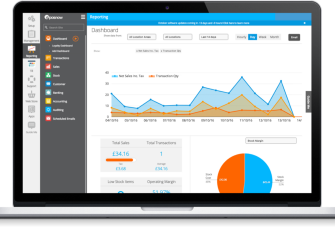
- Financial reporting. Restaurant POS systems like Epos Now offer reporting tools that offer dozens of essential insights into the financial situation of restaurants, including product profitability, and overall revenue by menu category, and it's all automated.
- MTD-ready. Digital records and integrations support HMRC's Making Tax Digital requirements automatically, so you stay compliant.
Final thoughts
The restaurant industry is a high-stakes business, and financial management is key to its success.
By following the steps outlined above, you can develop an effective financial strategy for your restaurant and stay on top of your expenses.
With the right restaurant bookkeeping software in place, you'll have the data necessary to make informed financial decisions that will help keep your business profitable.
Good luck!
Manage a hotel? Check out our hotel operations management guide to learn more about financial management and other aspects of running a successful hotel.
Frequently asked questions
- What is restaurant bookkeeping?
-
Restaurant bookkeeping is the process of recording and organising financial transactions, including sales, supplier payments/ingredient expenses, payroll, taxes and rent, so you have an accurate, up-to-date picture of your restaurant's financial health at all times and stay legally compliant.
- How often should a restaurant do its bookkeeping?
-
Bookkeeping is a constant process, but with automation, that doesn't necessarily mean you'll have much to do. POS reconciliation is a quick, daily task; you should review your food and labour percentages weekly. You should also conduct full monthly financial checks each month, and especially at the end of each quarter.
- What is a good food cost percentage for a restaurant?
-
Most restaurants aim for a food cost percentage between 28–35% of revenue, though this varies by cuisine and concept. Higher percentages usually signal an opportunity to review portioning, waste, or supplier pricing to increase margins.
- Do restaurants need to register for VAT?
-
Yes, once taxable turnover exceeds £90,000 in any rolling 12-month period. Below that threshold, registration is optional, though some restaurants register voluntarily if it benefits their VAT position.
- How does Making Tax Digital affect restaurant owners?
-
From April 2026, sole traders earning over £50,000 must keep digital records and submit quarterly updates to HMRC. The threshold drops in 2027 and 2028, and most limited companies ought to start preparing now.
- Should I use an accountant or bookkeeping software for my restaurant?
-
Most restaurants benefit from both. Accountants love POS integrations like Sage and Xero, which handles day-to-day recording, reconciliation and reporting, so an accountant can drop in with everything in order and send relevant records to HMRC and advise on tax strategy, compliance and bigger financial decisions that software can't make.
- How does a POS system help with restaurant bookkeeping?
-
A POS system gathers all the essential data, tracking food costs, inventory, sales, staff hours and wages, tax data. It reconciles takings daily, and supports payroll and MTD compliance, reducing manual admin significantly. And with an accounting integration, it even feeds sales data directly into accounting software