What Is a SKU? Stock-Keeping Unit Meaning & Examples



If you're just getting started in retail, you may be starting to encounter a number of retail terminologies that you don't fully understand. For instance, you may well be asking yourself "What is a SKU?".
In short, it's a stock-keeping unit (SKU, which you pronounce as "skew"). It's an important tool that every retailer should know and incorporate into their inventory management strategy.
Don't yet know what SKUs mean and why you need them? Don't worry. This complete guide is going to teach you everything you need to know about SKUs, from giving you a SKU definition to explaining how to implement them in your business.
Let's get started.
What is a SKU?
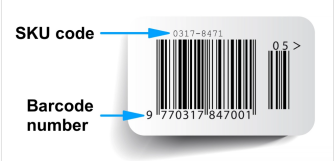
What is SKU meaning? What is a SKU number? Well, SKU stands for stock-keeping units, so a SKU number is the number assigned to each kind of stock a business holds. A SKU is a scannable code made of letters and numbers that's used to identify a specific product for inventory control purposes. These codes are usually printed on product labels and show details like colour, size, and brand.
Where are SKUs used?
Now that you know what it is, let's talk about where you can find them. You'll usually find SKUs used in:
- Retail stores
- Product fulfilment centres
- Warehouses,
- Ecommerce shops
- In catalogues
A SKU is crucial for inventory classification and helps these above businesses track inventory and manage inventory. Suppose you own a brick-and-mortar store, for example, you'd make sure that every product you own is assigned a SKU code before you perform any inventory audit in-store, at any storage units, or other off-site places. This'll give you a better understanding of your inventory.
Where is the SKU number found?
SKUs are more important to businesses than customers, so you may not notice them in your daily life all that often. But they're usually there, subtle but visible, if you know where to look. If you want to find a SKU, or you're deciding where to put one on your products, examine these spots and see if you can find some examples:
- Product packaging. SKUs can often be found on the edge or corner, somewhere out of the way, on packaging.
- Price tags. Printed small, but still visible, price tags often have SKUs printed on them.
- Receipts. SKUs often get printed alongside or beneath product names on receipts to help identify products if they get returned.
- POS systems. While you may identify products by the names when using your POS system, SKUs help identify products that have the same name but different varients, i.e a colour or size.
Why SKUs Matter for Your Business
Using SKUs effectively can improve the way your business manages inventory, sales, and operations on a day-to-day basis. Here's why they matter:
- Improved inventory accuracy: Using SKUs makes it easier to track stock levels and reduce inventory errors across products and locations.
- Faster order fulfilment: Clear product identification helps staff quickly pick, pack, and ship the correct items.
- Better demand forecasting: SKU-level sales data helps businesses spot trends and predict future inventory needs more accurately.
- Reduced stock discrepancies: A consistent SKU system helps prevent issues like duplicate listings, missing stock, and overselling.
- Improved profitability tracking: SKUs allow businesses to analyse product performance and identify which items generate the most profit.
Examples of SKUs in different business contexts
Let's take a look at some of the different SKUs out there. Here are the main two:
Multi-brand retail business SKU
If your business resells products from lots of different brands or manufacturers, you'll need different SKU formats to cover all necessary product details. This includes not just size, colour, and type, but also the manufacturer.
For example, a supermarket sells food and drink items from lots of different brands. If you fancy cereal, you can choose from Kellogs, Weetabix, Nestle, and so on. So, you'd need to keep track of that cereal by brand, as well as by type, flavour, and size.
Let's see this in action. If you work at a supermarket and were asked to create an SKU for your Kellogg's cereal, the SKU for that brand's Corn Flakes, in family-size, might look a little something like this:
- KG: The product’s brand, in this case Kellogg's.
- CFL: The product type, in this case Corn Flakes.
- FM: The product size, in this case, family-sized.
Single-brand DTC business SKU
This type of SKU is for those direct-to-consumer business owners who only sell products that are made by their own brands. In this case you may not want to prioritise adding manufacturer codes to your SKUs.
For example, a popular clothing brand may want to focus on including details like the type of fabric used and sizing in their SKUs, so that it's easier to manage their warehouses.
Let’s say you worked at one of these clothing stores and needed to create the SKU for a new bra line.
The SKU for that product in a size 32AA could look something like this: BRA-PNK-32AA
That SKU would translate to:
- BRA: The type of apparel, in this case, a bra.
- PNK: The main colour of the product, in this case pink.
- 32Aa: The size of the product.
The Four Types of SKUs
There are four main types of SKUs: simple SKUs, matrix SKUs, bundle SKUs, and kit SKUs. Each type helps businesses organise and track products in different ways depending on how they’re sold. Here they are:
- Simple SKUs: Used for individual products with no variations, such as a single notebook or coffee mug.
- Matrix SKUs: Used for products with multiple variations like size or colour, common in clothing and footwear retail.
- Bundle SKUs: Used when several products are sold together as one package to make a SKU for that product combo, like a meal deal or gift set.
- Kit SKUs: Used for products made up of separate components that are grouped together, often seen in furniture or DIY kits.
SKU vs UPC vs Serial Number
While SKUs, UPCs, and serial numbers all help identify products, they each serve a different purpose in retail and inventory management.
The complete retail POS system
Delight shoppers, speed up sales, and grow your business. Tailor your Epos Now retail POS to your exact needs with the Epos Now AppStore.
SKU inventory management
Now it’s time to get practical. This section will cover everything you need to know about SKU inventory management.
How to create SKU numbers
Now let's talk about creating SKUs. Follow these best practices to really nail this:
- Define the product category: Start with a short code that identifies the kind of product, such as TSH for t-shirts or MG for mugs.
- Add a brand or supplier code: Include a few letters to represent the brand, manufacturer, or supplier which can be used to group products together.
- Add key attributes: Include distinguishing product details like size, colour, flavour, or material. For example, BLK for black or LG for large.
- Add a unique identifier: Finish with a number sequence to distinguish similar products and avoid duplicate SKUs, like adding, say "104" at the end.
- Keep SKUs short where possible: Don't make your codes longer than they need to be, as that makes them harder to read.
- Avoid special characters: Stick to letters and numbers only, as symbols can create issues in some POS and inventory systems.
- Keep formatting consistent: Use the same structure across all products so staff can quickly understand and manage inventory.
- Upload into your POS system: Once created, add your SKUs into your POS or inventory management software to enable real-time stock tracking and reporting.
A black, large t-shirt from brand “Wicked Cool Wear” could use the SKU: TSH-WCW-BLK-LG-104
- TSH = Product category (t-shirt)
- WCW = Brand code (Wicked Cool Wear)
- BLK = Colour (black)
- LG = Size (large)
- 104 = Unique product identifier
Manual SKU inventory tracking
Manual SKU inventory tracking involves using pen and paper or simple spreadsheets to keep track of stock. It requires physically checking items' print labels and updating records by hand.
While it can be straightforward for small businesses with limited products, it can become time-consuming and prone to errors as inventory grows. So, we don't recommend this.
How to find a SKU number with automated management tools
Now, the entire process may seem a little tedious. However, don’t fret because you can automate SKU management, reducing costs and improving the accuracy of your SKU data.
To do this, you'll need a point-of-sale system (POS system) that has integrated inventory management, as well as other tools such as barcoding. Using POS software to manage your inventory lets you track items electronically, in real-time and also automatically update inventory.
Plus, the best POS systems come with built-in analytics that help improve your purchasing processes and come up with effective marketing and sales strategies.
TIP: Learn more about our automated inventory system in our complete guide.
Benefits of using product SKUs in your store
Here are some of the main perks of using product SKUs:
- Improved inventory management. You know that feeling when you can't find that one item buried somewhere in your store? Well, with SKUs, that's a thing of the past! Each product gets its own special code, making it super easy to track using your POS hardware. So, when a customer asks for that specific colour of sneakers or that special edition blender, you can find it in a flash. Plus, it helps you keep tabs on your best-sellers and what's gathering dust on the shelves.
- SKU tracking effects on customer experience. Imagine your customer walks into your store, all excited to buy something, but you're out of stock! That's going to really frustrate them. SKUs help prevent that disappointment. By keeping track of your inventory accurately, you can make sure your shelves are always stocked with the goodies your customers want. No more empty shelves or waiting weeks for a restock.
- SKU codes to forecast sales and optimise supply chain. Now, let's talk about being ahead of the game. Those little SKU codes contain a wealth of information. They tell you what's selling and what's not so popular. With that sales data, you can predict future sales trends and plan your inventory accordingly. On top of this, you can streamline your supply chain by understanding which products are in demand and when, and you can fine-tune your ordering process, ensuring you always have just the right amount of stock on hand.
SKU Mistakes to Avoid
Sometimes, businesses implement SKUs only to find they don't work as expected. A lot of the time, these inefficiencies can be chalked up to some easily avoided common mistakes. So we're explaining the most common ones here so you don't fall into the same traps:
- Do not start SKUs with 0. Some POS systems or spreadsheets strip leading zeros automatically, which can prevent them from recognising the products from their SKUs.
- Avoid ambiguous characters (O, I, L). Numbers and letters that look like other numbers and letters (0 and O, 1 and i, or l) can lead to searching for the wrong SKU.
- Avoid spaces or symbols. Spaces and special characters can also cause search issues in databases and search functions, leading to less effective results.
- Keep formats consistent. Inconsistent SKU structures make it harder to sort, scale, and manage inventory efficiently across systems.
Managing SKU numbers with Epos Now
With Epos Now, you've got everything you need to streamline your inventory management, including printing labels for all your products with SKUs.
Managing SKUs manually or without a clear system can quickly lead to disorganised inventory, duplication errors, and difficulty tracking products accurately as your business grows.
With Epos Now, you can simplify inventory control through:
- Real-time tracking so you always know what’s in stock
- Automated processes that reduce manual data entry and errors
- Analytics that help you understand product performance and make smarter decisions
If you’re starting from scratch, create a simple SKU format that reflects key product details like item type, size, colour, and brand. Not feeling creative? You can always use a handy SKU generator tool to do the heavy lifting for you.
Once your SKU system is ready, log into your Epos Now POS and go to the Back Office. Click on "Manage", "Products," then "Products List." Hit "Add Product" located in the top right corner of the page. A window will open where you can enter all relevant product details, including your SKU. When you’re done, click Save and your product will instantly appear in your Product List, ready for use.
With your SKUs properly set up in Epos Now, inventory becomes easier to manage, faster to update, and more reliable at scale. If you’re ready to streamline your stock control and reduce admin headaches, setting up your system in Epos Now is a strong next step.
FAQs about SKUs
- What is an example of a SKU?
-
Let's say you're in a shoe store eyeing those snazzy blue sneakers. The SKU might be something like "BLU-SNK-9W," where "BLU" stands for blue, "SNK" for sneaker, and "9W" for size 9 in women's.
- How long should SKUs be?
-
Keep it short and sweet! Typically, they're around 8 to 12 characters -just enough to pack in all the important details about the product without getting too wordy.
- Are serial numbers and model numbers the same?
-
No, serial numbers and model numbers are both product codes, but they serve different purposes. Serial numbers are unique identifiers assigned to individual products, while model numbers represent a specific product line or type.
- What are the 4 types of SKUs?
-
The four types of SKUs are simple SKUs, matrix SKUs, bundle SKUs, and kit SKUs. Each type serves a distinct purpose in retail inventory management, ranging from standard products to bundled or customised offerings.
- What’s the difference between a SKU and a barcode?
-
A SKU is an internal code created by a business, primarily to track inventory, while a barcode is a scannable identifying code, usually created by manufacturers and used all the way down the supply chain. SKUs are custom and flexible; barcodes are standardised and used for scanning at checkout in many businesses.
- Can two products share the same SKU?
-
No, each product ought to have a unique SKU to ensure accurate inventory tracking. Even variations of the same product, such as the same item in different sizes or colours, ought to have their own code to prevent stock errors, misreporting, and confusion in ordering or sales data. Always give your products distinct SKUs to maintain clarity and avoid costly mistakes in inventory management.
- Can I change my SKUs?
-
Yes, SKUs can be changed, but it should be done properly, and it's important to remember the changes you make. Updating SKUs will affect historical sales data and inventory records, so consistency is important. It’s best to plan your SKU structure early to avoid the need for changes and ensure smooth tracking across your systems and reports.
- How many SKUs should a small business have?
-
There’s no fixed, necessary number of SKUs for a small business. Different businesses have their own product ranges, and sell different items. Some may not need any at all. Others will need thousands. It all depends on your product range and complexity. What's more important is to have a clear and considered plan for inventory management and tracking.
- Does every product need a SKU?
-
Yes, every distinct product should have its own SKU to enable accurate tracking, stock control, and reporting. Even variations like size or colour should have separate SKUs. This ensures better visibility, reduces errors, and helps you manage inventory efficiently as your business expands.